Mình dùng SQL Server suốt 5 năm đầu career. .NET + SQL Server là combo mặc định — không ai hỏi tại sao, cũng không ai cân nhắc cái khác. Rồi một dự án cần database mà budget cho license là $0, hosting trên Linux container, và team không có Windows Server admin. SQL Server Express thì giới hạn 10GB database, 1GB RAM. Lựa chọn duy nhất hợp lý: PostgreSQL.
Ba năm sau, mình dùng Postgres cho mọi project mới. Không phải vì SQL Server tệ — nó rất mạnh. Mà vì Postgres cho mình mọi thứ cần thiết mà không tốn license, không giới hạn resource, và cộng đồng open source đang đổ rất nhiều năng lượng vào nó.
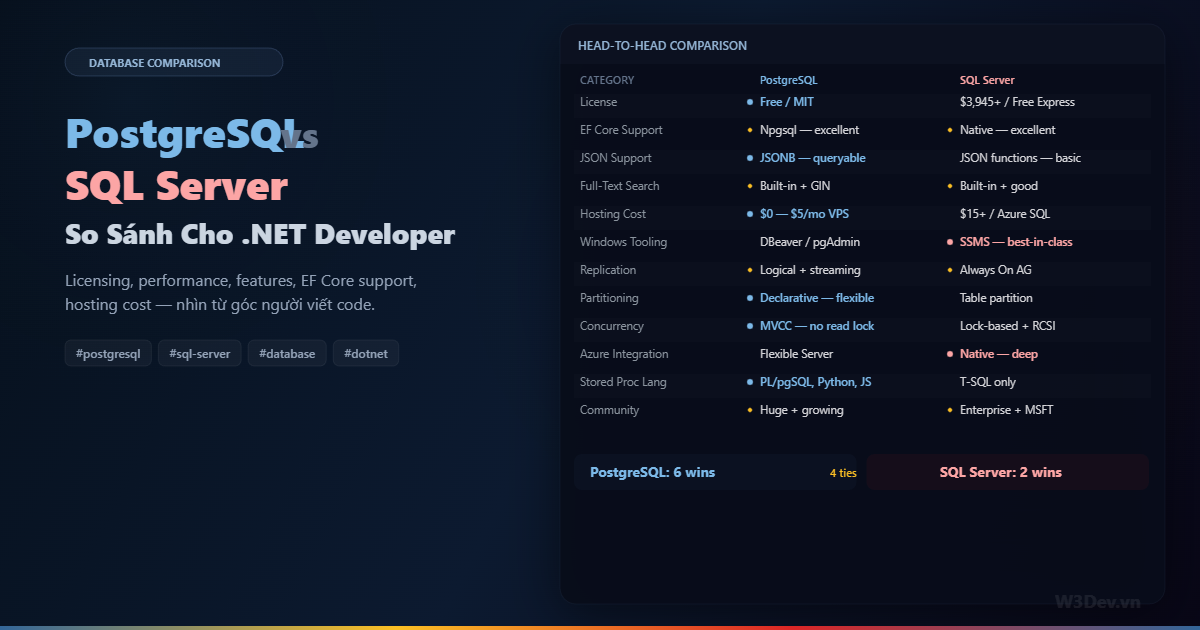
Bài viết này không phải "Postgres tốt hơn" hay "SQL Server tốt hơn" — mà là so sánh thực tế từ góc developer .NET: khi nào chọn cái nào, migrate khó không, và những khác biệt nào thực sự ảnh hưởng đến cách bạn viết code.
Licensing — khác biệt lớn nhất
PostgreSQL
Miễn phí hoàn toàn. PostgreSQL License (tương tự MIT) — dùng thương mại, modify source, distribute, không giới hạn gì. Không giới hạn CPU, RAM, database size, số connection. Chạy trên VPS $5/tháng hay cluster $10.000/tháng — cùng một phần mềm.
SQL Server
Phức tạp hơn nhiều:
Express (free):        10GB/database, 1GB RAM, 1 socket — đủ cho dev/demo
Standard:              $3,945/core (2-core minimum = $7,890)
Enterprise:            $15,123/core — full features
Developer (free):      Full Enterprise features, chỉ dùng dev/test
Azure SQL:
Basic (5 DTU):         ~$5/mo — rất chậm, chỉ cho dev
Standard (S0):         ~$15/mo — production nhỏ
Standard (S3):         ~$150/mo — production trung bình
Premium:               $465+/mo
Licensing SQL Server cho production on-premise tốn hàng chục nghìn USD. Azure SQL thì trả hàng tháng nhưng cũng đắt hơn PostgreSQL managed service đáng kể.
Tác động thực tế: side project, startup, SaaS sản phẩm mới — Postgres cho bạn database production-grade không tốn đồng nào. SQL Server Express giới hạn quá chặt cho production, và Standard license thì không phải startup nào cũng muốn chi.
EF Core Experience — gần như giống nhau
Đây là điều nhiều SQL Server dev lo lắng nhất khi chuyển: "EF Core có support Postgres tốt không?". Câu trả lời ngắn: rất tốt, gần như identical.
Thay đổi duy nhất trong code
// SQL Server
services.AddDbContext<AppDbContext>(options =>
    options.UseSqlServer(connectionString));

// PostgreSQL — chỉ đổi 1 dòng
services.AddDbContext<AppDbContext>(options =>
    options.UseNpgsql(connectionString));
LINQ queries, migrations, change tracking, lazy/eager loading, interceptors — tất cả giống hệt. Entity class không thay đổi. Repository pattern không thay đổi. 95% codebase giữ nguyên.
Khác biệt nhỏ cần biết
Naming convention. SQL Server mặc định PascalCase (OrderItems), PostgreSQL convention là snake_case (order_items). Npgsql có option tự convert:
options.UseNpgsql(connectionString)
    .UseSnakeCaseNamingConvention(); // NuGet: EFCore.NamingConventions
Một dòng config, mọi table/column tự thành snake_case. Không cần [Column("order_items")] ở từng property.
Identity column. SQL Server dùng IDENTITY(1,1), Postgres dùng GENERATED ALWAYS AS IDENTITY (hoặc serial cũ). EF Core tự handle — bạn không cần biết sự khác biệt này trừ khi viết raw SQL.
String comparison. SQL Server mặc định case-insensitive (WHERE Name = 'john' match "John", "JOHN"). PostgreSQL mặc định case-sensitive. Cần dùng ILIKE hoặc citext type nếu muốn case-insensitive.
// SQL Server — tự case-insensitive
.Where(p => p.Name == searchTerm)

// PostgreSQL — cần explicit
.Where(p => EF.Functions.ILike(p.Name, $"%{searchTerm}%"))
// hoặc
.Where(p => p.Name.ToLower() == searchTerm.ToLower())
DateTime. SQL Server có datetime, datetime2, datetimeoffset. PostgreSQL có timestamp (without tz) và timestamptz (with tz). EF Core map DateTime → timestamp, DateTimeOffset → timestamptz. Nhưng hành vi timezone khác nhau — PostgreSQL convert mọi timestamptz về UTC khi lưu.
Recommend: dùng DateTimeOffset trong C# và timestamptz trong Postgres — luôn rõ ràng timezone, không nhầm lẫn.
Sequence. SQL Server dùng IDENTITY mặc định. PostgreSQL dùng sequence. Khi bulk insert với explicit ID, SQL Server cần SET IDENTITY_INSERT ON. PostgreSQL không cần — nhưng cần update sequence counter sau bulk insert nếu muốn auto-increment tiếp.
Migration khác biệt
EF Core migrations generate SQL khác nhau cho mỗi provider, nhưng migration C# code giống nhau:
// migration code — giống hệt cho cả hai
migrationBuilder.CreateTable(
    name: "Products",
    columns: table => new
    {
        Id = table.Column<int>(nullable: false)
            .Annotation("Npgsql:ValueGenerationStrategy",
                NpgsqlValueGenerationStrategy.IdentityByDefaultColumn),
        Name = table.Column<string>(maxLength: 200),
        Price = table.Column<decimal>(type: "numeric(12,2)")
    });
Annotation khác nhau (Npgsql:ValueGenerationStrategy vs SqlServer:ValueGenerationStrategy) nhưng bạn ít khi đụng trực tiếp — EF Core tự generate.
Lưu ý khi migrate project từ SQL Server sang Postgres: tạo lại migration từ đầu (dotnet ef migrations add InitialCreate) thay vì cố dùng migration cũ. Migration SQL sinh ra hoàn toàn khác — nvarchar(max) không tồn tại trong Postgres.
Concurrency Model — khác biệt quan trọng
Đây là khác biệt kỹ thuật ảnh hưởng lớn nhất đến performance:
SQL Server: Lock-based
SQL Server mặc định dùng lock khi đọc và ghi. SELECT lấy shared lock, UPDATE lấy exclusive lock. Hai transaction cùng đọc thì OK, nhưng một transaction đang update thì transaction khác phải đợi mới đọc được.
Transaction A: UPDATE orders SET status = 'shipped' WHERE id = 1;
              (giữ exclusive lock trên row)

Transaction B: SELECT * FROM orders WHERE id = 1;
              (đợi... đợi... lock released → mới đọc được)
Kết quả: dưới tải nặng, reader block writer và ngược lại. SQL Server có READ COMMITTED SNAPSHOT ISOLATION (RCSI) để giảm vấn đề này — nhưng phải bật thủ công và tốn thêm tempdb.
PostgreSQL: MVCC (Multi-Version Concurrency Control)
PostgreSQL không lock khi đọc. Mỗi row có nhiều version — reader đọc version cũ trong khi writer tạo version mới. Reader không bao giờ block writer, writer không bao giờ block reader.
Transaction A: UPDATE orders SET status = 'shipped' WHERE id = 1;
              (tạo version mới, version cũ vẫn visible cho transaction khác)

Transaction B: SELECT * FROM orders WHERE id = 1;
              (đọc version cũ ngay lập tức — không đợi)
Tác động thực tế: API endpoint chạy report (đọc nhiều data) không block API endpoint xử lý đơn hàng (ghi). Postgres xử lý mixed read/write workload mượt hơn SQL Server ở default config.
Trade-off: MVCC tạo "dead tuples" — version cũ cần được dọn bởi VACUUM process. SQL Server không có vấn đề này. Postgres cần autovacuum chạy tốt — nếu config sai, table bloat theo thời gian.
Features độc quyền mỗi bên
Chỉ PostgreSQL có
JSONB native. Không phải lưu JSON dạng string rồi parse — JSONB là binary format, indexed, queryable bằng SQL operators. SQL Server có JSON support từ 2016 nhưng vẫn lưu dạng string, query performance kém hơn đáng kể.
Array columns. text[], integer[] — native array type. SQL Server không có equivalent.
Range types. daterange, int4range — biểu diễn khoảng giá trị, hỗ trợ overlap query native. Rất mạnh cho booking system, scheduling.
LISTEN/NOTIFY. Pub/sub built-in. SQL Server có Service Broker nhưng phức tạp hơn rất nhiều.
Procedural languages. Ngoài PL/pgSQL, Postgres cho phép viết stored procedure bằng Python (PL/Python), JavaScript (PL/V8), Perl, Tcl. SQL Server chỉ có T-SQL (và CLR integration phức tạp).
Extension ecosystem. PostGIS (geospatial), pgvector (AI embeddings), TimescaleDB (time-series), pg_trgm (fuzzy search), pg_cron (scheduled jobs) — cài extension mở rộng khả năng mà không cần thay database.
Chỉ SQL Server có
SSMS (SQL Server Management Studio). Database management tool tốt nhất thị trường — execution plan visual, query tuning advisor, maintenance plan wizard. pgAdmin không sánh được về UX.
Temporal Tables. Tự động track lịch sử thay đổi của row — query "data trông như thế nào lúc 3pm hôm qua?". Postgres làm được bằng trigger nhưng không có native support thanh lịch như vậy.
Always On Availability Groups. High availability cluster với automatic failover, đồng bộ data giữa replicas. Postgres có streaming replication nhưng setup phức tạp hơn, và failover cần tool thêm (Patroni, pg_auto_failover).
Window Functions tốt hơn. Cả hai đều có window functions, nhưng SQL Server support ROWS/RANGE BETWEEN sớm hơn và optimizer handle tốt hơn cho complex window queries.
Azure Deep Integration. Azure SQL Database, Elastic Pool, Hyperscale, Managed Instance — hệ sinh thái managed service của SQL Server trên Azure sâu hơn và mature hơn PostgreSQL Flexible Server.
CLR Integration. Chạy C# code trực tiếp trong database. Niche use case nhưng không database nào khác có.
Tooling cho .NET Developer
Database Management
                    PostgreSQL              SQL Server
──────────────────────────────────────────────────────
Best tool           DBeaver / pgAdmin       SSMS
Cross-platform      DBeaver ✓               Azure Data Studio ✓
Visual query plan   pgAdmin (basic)         SSMS (excellent)
EF Core CLI         dotnet ef ✓             dotnet ef ✓
Profiling           pg_stat_statements      SQL Profiler / XEvents
Monitoring          pg_stat_activity        Activity Monitor / DMVs
SSMS vẫn là lợi thế lớn của SQL Server ecosystem. Nếu bạn đã quen SSMS, chuyển sang pgAdmin sẽ thấy thiếu nhiều thứ. DBeaver bù lại phần nào nhưng không bằng.
ORM & Library Support
                    PostgreSQL              SQL Server
──────────────────────────────────────────────────────
EF Core             Npgsql (excellent)      Native (excellent)
Dapper              Npgsql driver ✓         Microsoft.Data ✓
Connection pool     Npgsql built-in         Microsoft.Data built-in
Bulk insert         Npgsql COPY             SqlBulkCopy
Migration           EF Core CLI ✓           EF Core CLI ✓
Profiling           MiniProfiler ✓          MiniProfiler ✓
Cả hai đều first-class citizen trong .NET ecosystem. Npgsql provider quality rất cao — maintained bởi Shay Rojansky, active development, release cùng lúc với mỗi EF Core version.
Hosting Cost — khác biệt thực tế
Self-hosted (VPS/on-premise)
PostgreSQL:
  Hetzner CX22 (2vCPU, 4GB):     €4.5/mo — chạy app + DB cùng server
  Dedicated DB server:            €8.5/mo trở lên
  License:                        $0

SQL Server:
  Express on VPS:                 $0 license + VPS cost
                                  (giới hạn 10GB/database, 1GB RAM)
  Standard on VPS:                $7,890 license + VPS cost
  Developer edition:              $0 (chỉ dev/test, KHÔNG production)
Postgres thắng tuyệt đối ở self-hosted. Cùng hardware, Postgres cho full features. SQL Server Express giới hạn quá nhiều cho production, và Standard license đắt.
Managed Service (Cloud)
PostgreSQL managed:
  DigitalOcean:                   $15/mo (1GB RAM, 10GB storage)
  Azure Flexible Server:          $13/mo (Burstable B1ms)
  Railway:                        $0 (1GB) → ~$7/mo
  Supabase:                       $0 (500MB) → $25/mo

SQL Server managed:
  Azure SQL Basic:                $5/mo (5 DTU — rất chậm)
  Azure SQL S0:                   $15/mo (10 DTU)
  Azure SQL S1:                   $30/mo (20 DTU)
  Azure SQL S3:                   $150/mo (100 DTU — production OK)
Azure SQL Basic/S0 rẻ nhưng cực chậm — mình đã benchmark: query đơn giản 50-100ms, under load lên 500ms+. PostgreSQL managed cùng giá cho performance tốt hơn vì không giới hạn DTU.
Tuy nhiên, Azure SQL có free tier 100K vCPU seconds/tháng với serverless — đủ cho side project. PostgreSQL managed ít khi có free tier tương đương (ngoại trừ Supabase và Railway).
Performance — phụ thuộc workload
Không có database "nhanh hơn" absolute. Performance phụ thuộc vào workload, schema design, indexing, và config.
OLTP (transaction processing) — hòa
Cả hai xử lý OLTP tốt. SQL Server optimizer mạnh hơn cho query plan phức tạp (nhiều JOIN, subquery). PostgreSQL optimizer đơn giản hơn nhưng MVCC giúp throughput cao hơn dưới concurrent write.
Analytical queries — phụ thuộc
SQL Server có Columnstore Index — cực kỳ nhanh cho aggregate query trên bảng lớn. PostgreSQL không có native columnstore nhưng có extension (Citus, pg_analytics) hoặc dùng partitioning + parallel query.
JSON-heavy workload — Postgres thắng rõ
Nếu data model dùng nhiều JSON (semi-structured data, document-style), JSONB của Postgres nhanh hơn JSON support của SQL Server gấp 2-5 lần cho indexed queries.
Full-text search — hòa
Cả hai có built-in FTS tốt. SQL Server setup đơn giản hơn (fulltext catalog + index). PostgreSQL linh hoạt hơn (custom dictionary, weight, ts_headline). Performance tương đương cho dataset cùng size.
Migration Path: SQL Server → PostgreSQL
Nếu bạn quyết định chuyển, đây là roadmap thực tế:
Bước 1: Đánh giá compatibility
Dễ migrate:
✓ Standard LINQ queries
✓ Entity Framework migrations
✓ Stored procedures đơn giản (CRUD)
✓ Views
✓ Triggers cơ bản

Cần refactor:
⚠ T-SQL specific syntax (MERGE, CROSS APPLY, STRING_AGG cũ)
⚠ Stored procedures phức tạp (cursor, temp table patterns)
⚠ SQL Agent Jobs → pg_cron
⚠ SSMS-specific tooling → DBeaver/pgAdmin
⚠ Windows Authentication → password/cert auth
⚠ SSIS packages → custom ETL
Bước 2: Schema migration
Dùng tool tự động convert schema, rồi review thủ công:
# pgloader — migrate schema + data tự động
pgloader mssql://user:pass@sqlserver/mydb \
         postgresql://user:pass@postgres/mydb
pgloader handle phần lớn type mapping tự động: nvarchar → text, datetime2 → timestamp, bit → boolean. Nhưng luôn review output — edge cases nhiều.
Bước 3: EF Core migration
# xóa migrations cũ (SQL Server specific)
rm -rf Migrations/

# đổi provider
# UseSqlServer → UseNpgsql

# tạo migration mới cho Postgres
dotnet ef migrations add InitialCreate
dotnet ef database update
Bước 4: Application code changes
Tìm và sửa:
// string comparison — SQL Server case-insensitive mặc định
// ❌ có thể sai trên Postgres
.Where(p => p.Name == "iphone")
// ✅ explicit case-insensitive
.Where(p => EF.Functions.ILike(p.Name, "iphone"))

// date function khác
// ❌ SQL Server specific
SqlFunctions.DateDiff(...)
// ✅ standard LINQ (EF Core translate cho mỗi provider)
.Where(o => o.CreatedAt >= startDate && o.CreatedAt <= endDate)

// raw SQL cần rewrite
// ❌ T-SQL
FromSqlRaw("SELECT TOP 10 * FROM Products")
// ✅ PostgreSQL
FromSqlRaw("SELECT * FROM Products LIMIT 10")
Bước 5: Test toàn bộ
Chạy full test suite. Focus vào: string comparison, date/time handling, numeric precision, NULL behavior (gần giống nhưng có edge case), và transaction isolation behavior.
Khi nào chọn cái nào?
Chọn PostgreSQL khi
- Budget license $0 — startup, side project, SaaS bootstrap
- Deploy trên Linux container (Docker, Kubernetes)
- Cần JSONB, array columns, hoặc PostGIS
- Team thoải mái với open source ecosystem
- Hosting ngoài Azure (AWS, GCP, Hetzner, DigitalOcean)
- Muốn tránh vendor lock-in
Chọn SQL Server khi
- Công ty đã có SQL Server license và expertise
- Deep Azure integration là requirement (Azure Functions binding, Logic Apps, Power BI trực tiếp)
- Team phụ thuộc SSMS và T-SQL tooling
- Cần Temporal Tables, Always On AG, hoặc Columnstore Index
- Enterprise compliance yêu cầu Microsoft stack
- Đã có hàng trăm stored procedures T-SQL — rewrite cost quá cao
Cả hai đều OK khi
- CRUD application chuẩn
- EF Core là data access chính (code gần giống nhau)
- Team sẵn sàng học tool mới
- Workload mixed read/write bình thường
- Không phụ thuộc feature đặc thù của bên nào
Thực tế thị trường 2026
Vài xu hướng đáng chú ý:
PostgreSQL market share tăng liên tục. Stack Overflow Survey, DB-Engines Ranking — Postgres là database yêu thích nhất nhiều năm liền và đang thu hẹp khoảng cách với SQL Server về adoption.
Microsoft đang invest vào Postgres. Azure Database for PostgreSQL Flexible Server, Citus (acquired), pg_auto_failover. Microsoft không chống Postgres — họ embrace nó như first-class citizen trên Azure.
SQL Server vẫn dominate enterprise. Fortune 500 companies, banking, healthcare — SQL Server và Oracle vẫn là backbone. Không thay đổi nhanh ở tầng này.
.NET community đang shift. Nhiều .NET project mới chọn Postgres. Npgsql download count trên NuGet tăng đều. Không phải vì SQL Server kém, mà vì Postgres "good enough" + free + flexible hơn.
Kết luận cá nhân
Nếu bắt đầu project mới và không có constraint nào buộc chọn SQL Server — mình chọn Postgres. Lý do đơn giản: free, full-featured ở mọi deployment size, chạy mượt trên Linux container, và EF Core support gần như identical.
Nếu đang dùng SQL Server và hệ thống chạy ổn — không có lý do chuyển. Migration cost thực tế (rewrite stored proc, retrain team, test regression) thường lớn hơn benefit. Chuyển khi có lý do cụ thể: giảm license cost, cần feature Postgres có mà SQL Server không, hoặc migrate lên platform không support SQL Server.
Tin tốt cho .NET developer: dù chọn gì, EF Core abstract 95% sự khác biệt. Code bạn viết gần như giống nhau. Chọn database phù hợp với team, budget, và infrastructure — không phải chiến tranh tôn giáo.

Leave a comment
Your email address will not be published. Required fields are marked *