Không ai thích viết documentation. Mình nói thẳng luôn — mình cũng ghét. Mỗi lần merge feature mới xong, việc cuối cùng muốn làm là ngồi viết lại cái mình vừa code thành văn bản cho người khác đọc. Kết quả? Docs luôn outdated, Swagger description trống trơn, README dừng ở phiên bản 6 tháng trước, và onboarding developer mới thì dùng miệng giải thích.
Nhưng documentation quan trọng — đặc biệt API docs cho team frontend, integration guide cho đối tác, và changelog cho stakeholder. Câu hỏi không phải "có nên viết docs không" mà là "làm sao viết mà ít đau nhất".
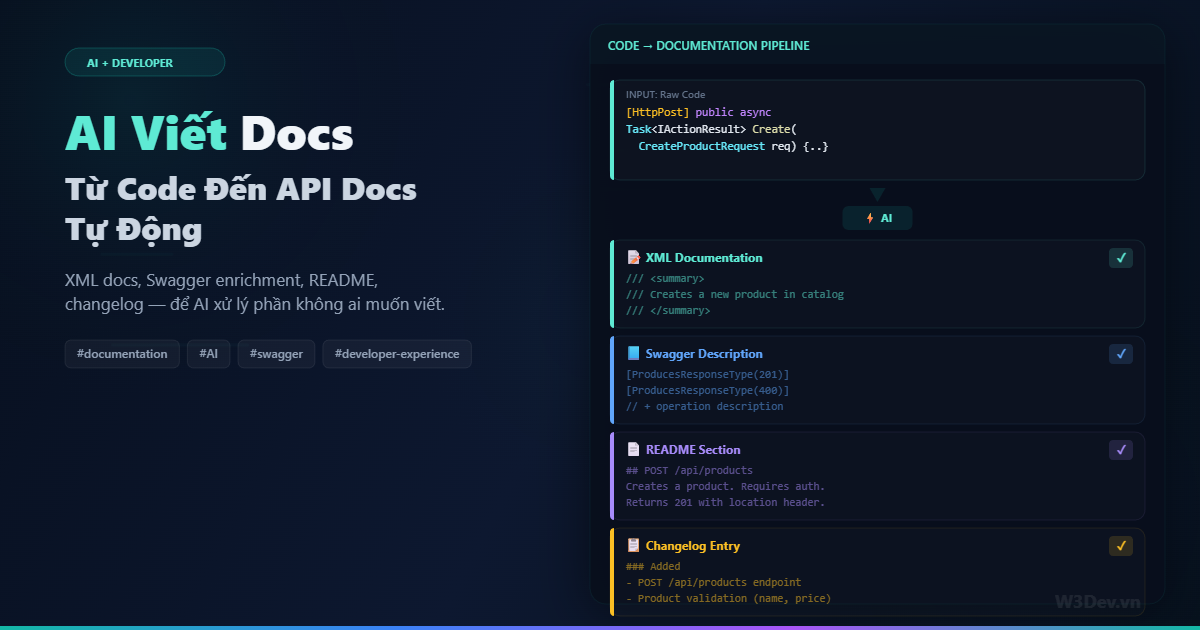
Câu trả lời năm 2026: để AI viết phần nặng, mình review và bổ sung phần business context. Bài viết này chia sẻ pipeline mình đang dùng — từ generate XML docs tự động, enrich Swagger annotations, đến viết README và changelog từ git history.
Tại sao AI viết docs tốt hơn bạn tưởng
Documentation đòi hỏi hai thứ: hiểu code làm gì (input/output, side effects, error cases) và diễn đạt rõ ràng bằng ngôn ngữ tự nhiên. AI mạnh ở cả hai — nó đọc code nhanh hơn người, và generate text chính xác nếu được prompt đúng.
Cái AI KHÔNG giỏi: giải thích TẠI SAO code tồn tại, business context đằng sau quyết định kỹ thuật, những gotcha mà chỉ người từng debug 3 tiếng mới biết. Những thứ đó vẫn cần con người viết. Nhưng nó chiếm có 20% documentation — 80% còn lại là mô tả WHAT và HOW, và AI xử lý tốt.
Phần 1: XML Documentation tự động
Vấn đề
C# XML docs đầy đủ trông thế này:
/// <summary>
/// Creates a new product in the catalog.
/// </summary>
/// <param name="request">
/// Product creation request containing name, price, category, and SKU.
/// </param>
/// <returns>
/// The newly created product with generated ID and timestamps.
/// </returns>
/// <exception cref="ValidationException">
/// Thrown when request data fails validation rules.
/// </exception>
/// <exception cref="DuplicateException">
/// Thrown when a product with the same SKU already exists.
/// </exception>
/// <response code="201">Product created successfully.</response>
/// <response code="400">Validation error in request data.</response>
/// <response code="409">Product with same SKU exists.</response>
[HttpPost]
[ProducesResponseType(typeof(ProductDto), StatusCodes.Status201Created)]
[ProducesResponseType(StatusCodes.Status400BadRequest)]
[ProducesResponseType(StatusCodes.Status409Conflict)]
public async Task<IActionResult> Create(CreateProductRequest request)
Viết cái này cho MỖI method, MỖI controller, MỖI service? Không ai làm. Nên phần lớn codebase chỉ có /// <summary> trống hoặc comment kiểu "Creates a product" — vô nghĩa vì nhìn tên method đã biết.
Giải pháp: Script generate XML docs bằng AI
// Tools/DocGenerator.cs — chạy local hoặc trong CI
public class AiDocGenerator
{
    private readonly HttpClient _http;
    private const string ApiUrl = "https://api.anthropic.com/v1/messages";

    public async Task<string> GenerateXmlDoc(string sourceCode, string filePath)
    {
        var prompt = $"""
            Analyze this C# source file and add comprehensive XML documentation
            to ALL public methods, classes, and properties that are missing docs.

            Rules:
            - Write <summary> that explains WHAT the method does, not HOW
            - Include <param> for every parameter with meaningful description
            - Include <returns> describing the return value
            - Include <exception> for every exception that can be thrown
            - Include <response> for controller actions with HTTP status codes
            - Include <remarks> only if there's a non-obvious behavior
            - Keep descriptions concise — one sentence per tag when possible
            - Do NOT modify any code logic, ONLY add XML comments
            - Return the COMPLETE file with docs added

            File: {filePath}

            ```csharp
            {sourceCode}
            ```
            """;

        // call AI API...
        return await CallAiApi(prompt);
    }
}
Chạy trên toàn bộ project:
# script đơn giản
find src/ -name "*.cs" -path "*/Controllers/*" | while read f; do
    dotnet run --project Tools/DocGenerator -- generate "$f"
done
Kết quả trước/sau
Trước:
[HttpGet("{id}")]
public async Task<IActionResult> GetById(int id)
{
    var product = await _productService.GetByIdAsync(id);
    if (product is null) return NotFound();
    return Ok(product);
}
Sau khi AI generate:
/// <summary>
/// Retrieves a product by its unique identifier.
/// </summary>
/// <param name="id">The product ID to look up.</param>
/// <returns>The product details if found.</returns>
/// <response code="200">Returns the product.</response>
/// <response code="404">Product with specified ID does not exist.</response>
[HttpGet("{id}")]
[ProducesResponseType(typeof(ProductDto), StatusCodes.Status200OK)]
[ProducesResponseType(StatusCodes.Status404NotFound)]
public async Task<IActionResult> GetById(int id)
AI thêm cả ProducesResponseType attributes mà trước đó thiếu — Swagger sẽ hiển thị response types chính xác hơn.
Tích hợp CI: chặn PR thiếu docs
# .github/workflows/docs-check.yml
- name: Check XML documentation coverage
  run: |
    # đếm public methods không có XML doc
    MISSING=$(grep -rn "public.*async\|public.*Task\|public.*IActionResult" src/ \
      | grep -v "///" | wc -l)

    if [ "$MISSING" -gt 0 ]; then
      echo "⚠️  $MISSING public methods missing XML docs"
      echo "Run 'dotnet run --project Tools/DocGenerator' to auto-generate"
      exit 1
    fi
PR thiếu docs? CI fail. Dev chạy generator, review output, commit. Documentation coverage đảm bảo 100%.
Phần 2: Swagger/OpenAPI enrichment
XML docs là cho developer đọc code. Swagger là cho consumer dùng API. Hai thứ liên quan nhưng không giống nhau — Swagger cần ví dụ request/response, mô tả business flow, và error format.
Tự generate Swagger examples
// Swagger filter tự động thêm examples
public class AiExampleSchemaFilter : ISchemaFilter
{
    public void Apply(OpenApiSchema schema, SchemaFilterContext context)
    {
        if (context.Type == typeof(CreateProductRequest))
        {
            schema.Example = new OpenApiObject
            {
                ["name"] = new OpenApiString("iPhone 15 Pro Max"),
                ["price"] = new OpenApiDouble(29990000),
                ["category"] = new OpenApiString("smartphones"),
                ["sku"] = new OpenApiString("IPH15PMX"),
                ["description"] = new OpenApiString(
                    "Apple iPhone 15 Pro Max 256GB Natural Titanium")
            };
        }
    }
}
Viết example cho từng DTO bằng tay thì chán. Dùng AI generate:
public class AiSwaggerEnricher
{
    public async Task<Dictionary<string, object>> GenerateExample(Type dtoType)
    {
        var properties = dtoType.GetProperties()
            .Select(p => $"{p.Name}: {p.PropertyType.Name}")
            .ToList();

        var prompt = $"""
            Generate a realistic JSON example for this DTO:
            Type: {dtoType.Name}
            Properties: {string.Join(", ", properties)}

            Rules:
            - Use realistic Vietnamese e-commerce data
            - Prices in VND (no decimals)
            - Names in Vietnamese when appropriate
            - Return ONLY valid JSON, no explanation
            """;

        var json = await CallAiApi(prompt);
        return JsonSerializer.Deserialize<Dictionary<string, object>>(json);
    }
}
Enrich operation descriptions
Swagger mặc định chỉ hiển thị summary ngắn từ XML docs. Bạn có thể thêm detailed description:
public class AiOperationFilter : IOperationFilter
{
    public void Apply(OpenApiOperation operation, OperationFilterContext context)
    {
        // lấy method info
        var method = context.MethodInfo;
        var controller = method.DeclaringType?.Name;

        // AI-generated description (cached)
        operation.Description = GetOrGenerateDescription(
            controller, method.Name, method.GetParameters());
    }

    private string GetOrGenerateDescription(
        string controller, string method, ParameterInfo[] parameters)
    {
        // check cache trước — không gọi AI mỗi request
        var cacheKey = $"{controller}.{method}";
        if (_cache.TryGetValue(cacheKey, out var cached))
            return cached;

        // generate bằng AI (chạy offline, lưu file)
        var description = GenerateWithAi(controller, method, parameters);
        _cache[cacheKey] = description;
        return description;
    }
}
Quan trọng: KHÔNG gọi AI mỗi HTTP request. Generate offline, cache vào file JSON hoặc embedded resource, dùng khi Swagger render.
Build-time Swagger generation
// program chạy lúc build để generate swagger.json enriched
public class SwaggerGenerator
{
    public static async Task Main(string[] args)
    {
        var builder = WebApplication.CreateBuilder(args);
        // ... setup services

        var app = builder.Build();

        // export swagger.json
        var swagger = app.Services.GetRequiredService<ISwaggerProvider>();
        var doc = swagger.GetSwagger("v1");

        // enrich bằng AI
        await EnrichWithAi(doc);

        // lưu file
        var json = JsonSerializer.Serialize(doc);
        await File.WriteAllTextAsync("docs/swagger.json", json);
    }

    private static async Task EnrichWithAi(OpenApiDocument doc)
    {
        foreach (var path in doc.Paths)
        {
            foreach (var op in path.Value.Operations)
            {
                if (string.IsNullOrEmpty(op.Value.Description))
                {
                    op.Value.Description = await GenerateDescription(
                        path.Key, op.Key.ToString(), op.Value);
                }
            }
        }
    }
}
Chạy trong CI:
- name: Generate enriched Swagger
  run: dotnet run --project Tools/SwaggerGenerator
- name: Upload to API portal
  run: |
    curl -X PUT "https://api-portal.example.com/docs" \
      -H "Authorization: Bearer ${{ secrets.PORTAL_TOKEN }}" \
      -F "spec=@docs/swagger.json"
Mỗi lần deploy, API docs tự cập nhật.
Phần 3: README generation từ codebase
README cho project mới thường copy từ template rồi quên update. AI có thể scan project và generate README chính xác:
# scripts/generate_readme.py
import anthropic
import os
import glob

def scan_project():
    """Collect project metadata"""
    info = {
        "csproj": open(glob.glob("src/**/*.csproj", recursive=True)[0]).read(),
        "program_cs": open("src/Api/Program.cs").read(),
        "controllers": [os.path.basename(f)
                       for f in glob.glob("src/**/Controllers/*.cs", recursive=True)],
        "docker": os.path.exists("Dockerfile"),
        "ci": os.path.exists(".github/workflows/ci.yml"),
        "tests": len(glob.glob("tests/**/*Tests.cs", recursive=True)),
    }
    return info

def generate_readme(info):
    client = anthropic.Anthropic()
    response = client.messages.create(
        model="claude-sonnet-4-20250514",
        max_tokens=3000,
        messages=[{
            "role": "user",
            "content": f"""
Generate a README.md for this .NET project.

Project info:
- csproj: {info['csproj']}
- Program.cs (DI setup): {info['program_cs'][:2000]}
- Controllers: {info['controllers']}
- Has Docker: {info['docker']}
- Has CI/CD: {info['ci']}
- Test files: {info['tests']}

README must include:
## Overview (2-3 sentences from project metadata)
## Tech Stack (from csproj dependencies)
## Getting Started (prerequisites, clone, run)
## API Endpoints (table from controllers)
## Docker (if Dockerfile exists)
## Testing (from test project)
## Project Structure (tree from actual folders)

Keep it concise. No fluff.
Output valid markdown only."""
        }]
    )
    return response.content[0].text
Output: README chính xác với đúng endpoint list, đúng dependency, đúng docker command. Chạy lại khi project thay đổi — README luôn up-to-date.
Phần 4: Changelog tự động từ git
Đây là phần mình thích nhất — AI đọc git log và viết changelog cho con người đọc:
#!/bin/bash
# scripts/generate_changelog.sh

# lấy commits từ release trước
LAST_TAG=$(git describe --tags --abbrev=0 2>/dev/null || echo "")
if [ -z "$LAST_TAG" ]; then
    COMMITS=$(git log --oneline --no-merges)
else
    COMMITS=$(git log "${LAST_TAG}..HEAD" --oneline --no-merges)
fi

# lấy changed files
CHANGED_FILES=$(git diff --name-only "$LAST_TAG"..HEAD 2>/dev/null || git diff --name-only HEAD~20)

# gọi AI để viết changelog
cat << EOF | curl -s https://api.anthropic.com/v1/messages \
  -H "Content-Type: application/json" \
  -H "x-api-key: $ANTHROPIC_API_KEY" \
  -H "anthropic-version: 2023-06-01" \
  -d @-
{
  "model": "claude-sonnet-4-20250514",
  "max_tokens": 2000,
  "messages": [{
    "role": "user",
    "content": "Generate a CHANGELOG entry from these git commits.\n\nCommits:\n${COMMITS}\n\nChanged files:\n${CHANGED_FILES}\n\nFormat: Keep Changelog format (Added/Changed/Fixed/Removed). Group related commits. Write from user perspective, not developer. Output markdown only."
  }]
}
EOF
Input (git log):
a1b2c3d feat(products): add search endpoint with full-text search
d4e5f6g fix(orders): fix duplicate items in cart calculation
g7h8i9j feat(auth): add refresh token rotation
k0l1m2n chore: update EF Core to 8.0.3
o3p4q5r fix(shipping): correct weight calculation for international
s6t7u8v feat(products): add category filter to listing endpoint
Output (AI-generated changelog):
## [1.3.0] - 2026-03-11

### Added
- **Product Search**: Full-text search for products with relevance ranking
- **Category Filter**: Filter product listings by category
- **Token Refresh**: Automatic refresh token rotation for improved security

### Fixed
- **Cart Calculation**: Fixed issue where items appeared duplicated
  when multiple payment methods were selected
- **Shipping Rates**: Corrected weight-based calculation for
  international orders

### Changed
- Updated Entity Framework Core to 8.0.3 for performance improvements
AI nhóm commits liên quan, viết description cho người dùng (không phải dev), và format chuẩn Keep Changelog. Git log fix(shipping): correct weight calculation trở thành "Corrected weight-based calculation for international orders" — dễ hiểu hơn cho stakeholder.
Tích hợp vào release workflow
# .github/workflows/release.yml
- name: Generate changelog
  run: |
    ./scripts/generate_changelog.sh > RELEASE_NOTES.md

- name: Create GitHub Release
  uses: softprops/action-gh-release@v2
  with:
    body_path: RELEASE_NOTES.md
    tag_name: v${{ env.VERSION }}
Mỗi release tự có changelog — không ai phải viết tay.
Phần 5: Migration guide khi breaking changes
Khi bạn đổi API contract (rename field, thay đổi response format, deprecate endpoint), consumer cần migration guide. AI đọc diff và generate:
# so sánh hai version swagger.json
diff <(jq . docs/swagger-v1.json) <(jq . docs/swagger-v2.json) > api_diff.txt

# AI generate migration guide
cat << PROMPT | call_ai
Given this API diff between v1 and v2, generate a migration guide
for API consumers.

Diff:
$(cat api_diff.txt)

Format:
## Breaking Changes (must fix)
## Deprecations (fix before next version)
## New Endpoints (optional adoption)

For each change, show: what changed, old vs new, code example to migrate.
PROMPT
Output:
## Breaking Changes

### `GET /api/products` — Response format changed

**Before (v1):**
```json
[{ "id": 1, "name": "iPhone", "price": 29990000 }]
After (v2):
{
  "data": [{ "id": 1, "name": "iPhone", "price": 29990000 }],
  "pagination": { "page": 1, "totalPages": 5 }
}
Migration: Access products via response.data instead of directly iterating the response array.
Consumer nhìn vào biết ngay cần sửa gì, không cần đọc code hay hỏi backend team.

## Prompt engineering cho docs chất lượng

Sau nhiều lần iterate, đây là những nguyên tắc prompt mình rút ra:

**Cho context cụ thể.** "Document this method" → output generic. "Document this method for a REST API consumed by Angular frontend team, they need to know request format and error codes" → output targeted.

**Chỉ rõ audience.** API docs cho frontend dev khác hoàn toàn API docs cho mobile dev khác docs nội bộ. Nói rõ ai sẽ đọc.

**Cho ví dụ output mong muốn.** Đưa AI xem một docs block bạn đã viết tốt và bảo "generate theo style này cho các method còn lại". Few-shot learning hiệu quả hơn instruction dài dòng.

**Yêu cầu realistic examples.** "Use Vietnamese e-commerce data" cho Swagger examples thay vì "foo", "bar", "Lorem ipsum". Docs với ví dụ thật dễ hiểu hơn gấp bội.

## Không dùng AI cho những docs nào?

**Architecture Decision Records (ADR).** Tại sao chọn PostgreSQL thay vì MongoDB? Tại sao dùng CQRS? AI không biết context team, budget, timeline, political factors. ADR phải do người viết.

**Incident postmortem.** AI không biết chuyện gì đã xảy ra lúc 3 giờ sáng, ai đã làm gì, timeline chính xác ra sao. Postmortem cần sự trung thực, không cần văn hay.

**Security documentation.** Auth flow, data encryption policy, compliance requirements — đây là docs có legal implications. AI có thể miss nuance quan trọng. Để security team viết và review.

**Onboarding guide mang tính "tribal knowledge".** Kiểu "deploy production phải SSH vào bastion host trước, dùng key XYZ, rồi chạy script ở /opt/deploy — nhưng thứ Sáu đừng deploy vì traffic cao". AI không biết những thứ này.

## Workflow tổng hợp
Developer viết code ↓ Pre-commit hook: AI generate XML docs cho method mới ↓ PR opened: CI check docs coverage ↓ PR merged: CI generate swagger.json enriched ↓ Release tag: AI generate changelog từ git log ↓ Breaking change detected: AI generate migration guide ↓ Quarterly: AI regenerate README từ project scan
Mỗi bước tự động hoặc semi-auto (AI generate, human review). Developer gần như không phải mở file README hay CHANGELOG để viết tay nữa.

## Cost thực tế

Mỗi lần generate docs cho một file controller (~200 dòng code): khoảng 2.000-3.000 tokens input + 1.000-1.500 tokens output. Với Claude Sonnet, tốn khoảng $0.01-0.02 per file.

Toàn bộ project 50 controller files: ~$0.50-1.00. Chạy mỗi release cycle (2 tuần): ~$2/tháng. Rẻ hơn một ly cà phê và tiết kiệm hàng giờ đồng hồ.

## Tổng kết

AI không thay thế documentation — nó thay thế phần mechanical mà không ai muốn làm. XML docs mô tả input/output? AI viết. Swagger examples? AI generate. Changelog từ git? AI tổng hợp. Migration guide? AI đọc diff.

Phần con người vẫn cần: review output, bổ sung business context, viết ADR, và quan trọng nhất — đảm bảo docs ĐÚNG chứ không chỉ CÓ. Documentation sai còn tệ hơn không có documentation.

Pipeline mình chia sẻ ở trên không tốn nhiều effort setup — vài script, vài CI step. Nhưng kết quả là project luôn có docs up-to-date, Swagger luôn có description và examples, changelog tự viết mỗi release. Đó là developer experience mà cả team hưởng lợi.

Leave a comment
Your email address will not be published. Required fields are marked *