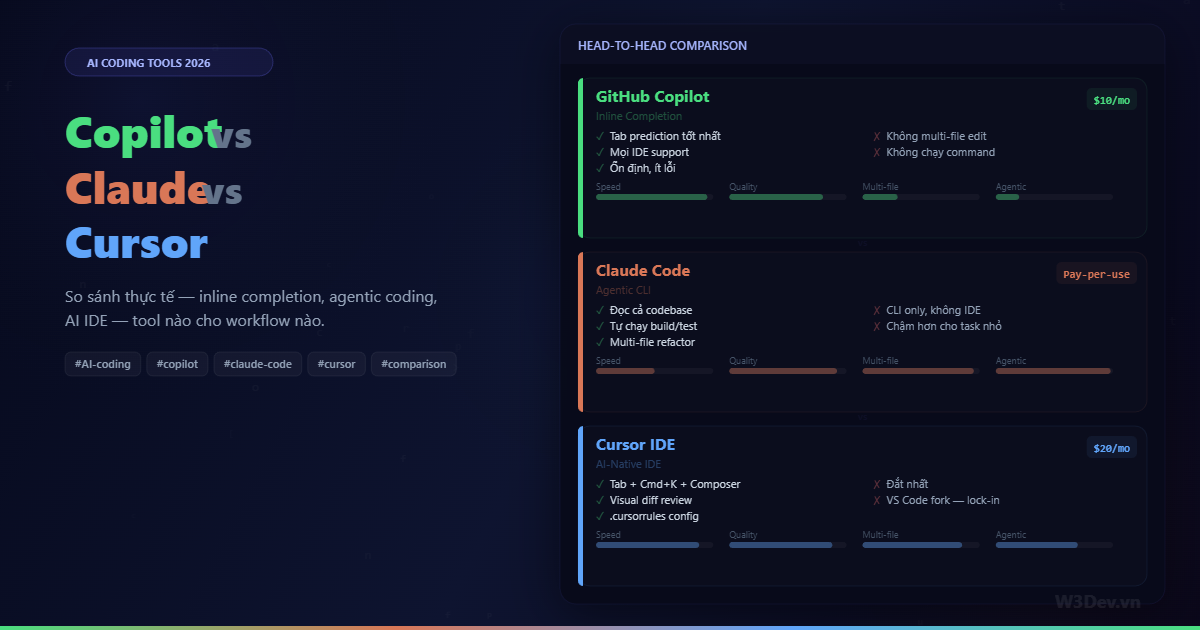
Ba tool, ba triết lý hoàn toàn khác nhau. Copilot gợi ý từng dòng khi bạn đang gõ. Claude Code đọc cả project rồi tự viết, tự build, tự test. Cursor nhúng AI vào mọi ngóc ngách của editor. Mỗi cái giải quyết một vấn đề riêng — và nhiều dev (kể cả mình) dùng cả ba cùng lúc.
Bài viết này không phải review từng tool — mình đã viết bài riêng cho Claude Code và Cursor rồi. Đây là bài so sánh trực tiếp: cùng task thì tool nào xử lý tốt hơn, combo nào hợp lý, và workflow thực tế khi dùng cả ba.
Mọi đánh giá dựa trên trải nghiệm cá nhân với .NET + Angular stack, tháng 3/2026. AI coding thay đổi nhanh — kết luận hôm nay có thể khác 6 tháng nữa.
Trước tiên: ba triết lý khác nhau
Hiểu triết lý thiết kế giúp hiểu khi nào tool nào mạnh:
GitHub Copilot — autocomplete thông minh. Ngồi cạnh bạn khi bạn gõ, gợi ý phần tiếp theo. Bạn vẫn lái, AI chỉ suggest. Low-risk, low-friction — bật lên là dùng, tắt đi code vẫn bình thường.
Claude Code — đồng nghiệp senior ngồi ở terminal. Bạn mô tả task, nó tự navigate codebase, tìm file liên quan, viết code, chạy test, sửa lỗi. Bạn delegate cả chunk of work. High-capability, high-trust-required.
Cursor — editor được thiết kế cho AI. Tab completion + inline edit (Cmd+K) + multi-file generation (Composer) + chat — tất cả trong cùng IDE. AI không phải add-on mà là first-class citizen.
So sánh 1: Viết code mới
Task: Thêm endpoint GET /api/products với pagination, filter, sort
Copilot:
Mở file ProductsController.cs, bắt đầu gõ [HttpGet]. Copilot suggest cả method signature + body. Accept, sửa vài chỗ, gõ tiếp phần filter logic — Copilot predict dựa trên code vừa viết. Tạo ProductDto trong file mới — gõ public record Product, Copilot suggest properties dựa trên entity class đang mở tab khác.
Thời gian: 8-12 phút. Bạn gõ mọi thứ, Copilot accelerate bằng suggestion. Kết quả chính xác vì bạn kiểm soát từng dòng.
Claude Code:
❯ Thêm endpoint GET /api/products với pagination (page, pageSize),
  filter theo category và price range, sort theo field tùy chọn.
  Tạo ProductDto, dùng pattern như OrdersController.
  Chạy build + test sau khi xong.
Claude Code đọc OrdersController, OrderDto, AppDbContext, hiểu convention project. Tạo 3 file (controller, DTO, request class), sửa Program.cs nếu cần register service. Chạy dotnet build — nếu lỗi thì tự sửa. Chạy dotnet test — 24 tests passed.
Thời gian: 2-4 phút. Nhưng cần review code kỹ — 5 phút review. Tổng ~7-9 phút đến confident merge.
Cursor:
Mở Composer (Cmd+Shift+I):
Tạo GET /api/products endpoint với pagination, filter category + price range,
sort field tùy chọn. Tham chiếu @OrdersController.cs cho convention.
Tạo ProductDto và ProductQueryRequest.
Composer tạo files, hiện diff visual từng file. Review, accept/reject từng change. Không cần mở terminal — mọi thứ trong IDE.
Thời gian: 3-5 phút. Review nhanh hơn Claude Code nhờ visual diff ngay trong editor.
Verdict: Claude Code nhanh nhất cho "tạo từ đầu theo pattern". Cursor close second với UX đẹp hơn. Copilot chậm nhất nhưng bạn control mỗi dòng — ít risk nhất.
So sánh 2: Fix bug
Task: API trả duplicate items khi order có nhiều payment methods
Copilot:
Mở file query, nhìn thấy .Include(o => o.Items).Include(o => o.Payments). Copilot không tự phát hiện bug — bạn phải biết Cartesian Explosion trước. Gõ .AsSplitQuery(), Copilot suggest đúng. Hoặc gõ comment // fix: split query to avoid cartesian product, Copilot suggest dòng code.
Copilot giúp gõ nhanh hơn khi bạn ĐÃ BIẾT fix. Nó không diagnosis.
Claude Code:
❯ API /api/orders trả duplicate items khi order có
  nhiều payment methods. Query ở OrderService.cs dòng 45.
  Phân tích nguyên nhân và fix.
Claude Code đọc query, nhận ra .Include() trên hai collection gây Cartesian product. Output:
Nguyên nhân: Include(Items) + Include(Payments) tạo
  cartesian join — 3 items × 2 payments = 6 rows thay vì 3.

Fix: thêm .AsSplitQuery()
  hoặc restructure query dùng projection.

Đã sửa OrderService.cs dòng 45-52.
Build succeeded. Test passed.
Claude Code diagnosis + fix. Mạnh hơn Copilot rõ ràng cho debug.
Cursor:
Chọn đoạn query, Cmd+K: "Fix: query này trả duplicate items vì cartesian explosion khi include nhiều collection". Cursor sửa inline, hiện diff. Hoặc Cmd+L (chat) paste error + file, hỏi "tại sao duplicate" — nhận giải thích + suggested fix, bấm "Apply" để sửa.
Cursor = Claude Code reasoning + visual diff. Combo mạnh cho debug.
Verdict: Claude Code và Cursor mạnh ngang nhau cho debug. Copilot không debug — chỉ assist gõ code khi bạn đã biết fix.
So sánh 3: Refactor lớn
Task: Chuyển 5 controllers từ trả entity sang trả DTO pattern
Copilot:
Mở controller đầu tiên, gõ ProductDto class, Copilot suggest properties. Gõ mapping logic, Copilot suggest. Repeat cho 4 controller còn lại. Mỗi controller ~5-8 phút × 5 = 25-40 phút.
Copilot giúp gõ nhanh hơn ~30% so với tự gõ. Nhưng bạn phải mở từng file, sửa từng method.
Claude Code:
❯ Chuyển 5 controllers sau từ trả entity sang DTO pattern:
  ProductsController, OrdersController, CustomersController,
  CategoriesController, ReportsController.
  Tạo DTO riêng cho mỗi entity.
  Giữ nguyên endpoint signature.
  Làm từng controller một, chạy test sau mỗi controller.
Claude Code: đọc 5 controllers + entities → tạo 5 DTO classes → sửa 5 controllers → chạy test sau mỗi cái. Nếu test fail → tự sửa.
Thời gian: 10-15 phút cho toàn bộ 5 controllers. Bạn review diff cuối cùng.
Cursor:
Mở Composer, mô tả tương tự. Cursor tạo files, hiện diff cho từng file — bạn review visual. Nhưng Composer xử lý tốt nhất 3-5 files/session. 5 controllers + 5 DTOs = 10 files → nên chia 2 session.
Thời gian: 12-18 phút (2 Composer sessions + review).
Verdict: Claude Code thắng rõ cho refactor lớn nhiều file. Nó đọc toàn bộ context, sửa coherently, và verify bằng build + test. Cursor close second nhưng multi-file limit rõ hơn. Copilot không phù hợp — quá manual.
So sánh 4: Viết test
Task: Unit test cho CartService (8 test cases)
Copilot:
Mở test file mới. Gõ [Fact] public void AddItem_Should — Copilot suggest tên test + body. Accept, gõ test tiếp — Copilot nhìn pattern test trước, suggest test sau theo cùng arrange-act-assert. Sau 2-3 test, prediction rất tốt vì pattern rõ.
Thời gian: 10-15 phút. Copilot mạnh cho test vì test code repetitive, pattern-based.
Claude Code:
❯ Viết unit test cho CartService.cs.
  Cases: add item, add duplicate → tăng quantity,
  remove item, remove không tồn tại → ignore,
  update quantity = 0 → auto remove,
  clear cart, tính total với discount, empty cart total = 0.
  Dùng xUnit + Moq, theo convention OrderServiceTests.
Tạo file test hoàn chỉnh, 8 test methods, mock setup, helper methods. Chạy dotnet test — 8/8 passed.
Thời gian: 3-5 phút. Nhưng mình thường phải thêm 1-2 edge case mà Claude Code miss — tổng ~7-8 phút.
Cursor:
Mở Composer, tag @CartService.cs và @OrderServiceTests.cs, mô tả test cases. Cursor generate, hiện diff, accept. Hoặc mở CartService.cs, Cmd+L chat: "Viết unit test cho file này, cover happy path + edge cases" → nhận code → bấm Apply.
Thời gian: 5-8 phút.
Verdict: Hòa — mỗi tool mạnh theo cách riêng. Claude Code nhanh nhất cho generate ban đầu. Copilot tốt nhất khi bạn muốn control từng test case, thêm từng test. Cursor ở giữa — nhanh mà vẫn visual review.
So sánh 5: Đọc hiểu codebase mới
Task: Hiểu auth flow trong project mới join
Copilot: Không giúp được gì ở đây. Copilot không explain code, không navigate codebase.
Claude Code:
❯ Giải thích authentication flow trong project này.
  JWT hay Cookie? Middleware nào? Token refresh ở đâu?
  Vẽ diagram text-based.
Claude Code scan Program.cs, tìm auth middleware, đọc AuthController, JwtService, RefreshTokenService. Trả về explanation chi tiết + text diagram.
Mạnh nhất cho codebase exploration. Đọc toàn bộ project, không chỉ file đang mở.
Cursor:
Cmd+L chat, tag @codebase:
Giải thích authentication flow. Middleware nào, token format,
refresh mechanism, nơi lưu token.
Cursor đọc indexed codebase, trả lời. Không mạnh bằng Claude Code vì Cursor index chọn lọc, đôi khi miss file quan trọng.
Verdict: Claude Code thắng rõ cho codebase exploration. Full project context không tool nào sánh.
Bảng so sánh tổng hợp
Task                  Copilot        Claude Code    Cursor
─────────────────────────────────────────────────────────────
Inline completion     ★★★★★         ★☆☆☆☆         ★★★★☆
Viết code mới         ★★★☆☆         ★★★★★         ★★★★☆
Fix bug               ★★☆☆☆         ★★★★★         ★★★★☆
Refactor lớn          ★★☆☆☆         ★★★★★         ★★★★☆
Viết test             ★★★★☆         ★★★★☆         ★★★★☆
Code review           ★☆☆☆☆         ★★★★☆         ★★★☆☆
Explore codebase      ★☆☆☆☆         ★★★★★         ★★★☆☆
Documentation         ★★☆☆☆         ★★★★★         ★★★☆☆
Git operations        ★☆☆☆☆         ★★★★☆         ★★☆☆☆
Learning/explaining   ★☆☆☆☆         ★★★★★         ★★★★☆
─────────────────────────────────────────────────────────────
Interface             IDE plugin     Terminal CLI    Full IDE
Giá                   $10/mo         ~$10-30/mo*    $20/mo
Model                 GPT-4o         Claude Sonnet  Multi-model
Offline               ✗              ✗              ✗
Self-hosted model     ✗              ✗              Có (config)
─────────────────────────────────────────────────────────────
* Claude Code pay-per-use, $10-30 tùy usage
Chi phí thực tế hàng tháng
Mình track usage trong 3 tháng:
GitHub Copilot:       $10/mo (fixed)
Claude Code:          $15-25/mo (API usage, ~200 prompts/mo)
Cursor Pro:           $20/mo (fixed, 500 fast requests)
─────────────────────────────────────────
Tổng:                 $45-55/mo

Nếu chọn 2:
  Copilot + Claude Code:   $20-35/mo → best value
  Copilot + Cursor:        $30/mo → best UX
  Claude Code + Cursor:    $35-45/mo → best capability
$45-55/mo cho cả ba. Đắt? So với thời gian tiết kiệm — ước tính 1-2 giờ mỗi ngày — nó rẻ hơn salary tính theo giờ rất nhiều.
Nếu budget hạn chế, Copilot + Claude Code (~$25/mo) là combo mình recommend nhất — Copilot cho inline hàng ngày, Claude Code cho task lớn.
Workflow thực tế: dùng cả ba trong một ngày
Đây là cách mình combine:
8:30 — Morning standup, plan task. Mở Claude Code trong terminal:
❯ Đọc git log 5 ngày qua, tóm tắt changes.
  Có PR nào chưa merge? Branch nào đang active?
Nắm context nhanh trước khi bắt đầu.
9:00 — Feature mới: thêm notification system. Mở Claude Code:
❯ Tôi cần thêm notification system. Suggest approach:
  file nào cần tạo, pattern nào dùng.
  Chưa code, chỉ plan.
Confirm plan. Rồi:
❯ Implement theo plan. Tạo NotificationService,
  NotificationHub (SignalR), migration cho Notifications table.
Claude Code scaffold 4-5 files, build, test.
10:00 — Polish code. Chuyển sang Cursor. Mở files Claude Code vừa tạo. Cmd+K trên từng method: "thêm null check", "cải thiện error message", "thêm XML doc". Tab completion assist khi sửa nhỏ. Copilot bật background — predict code khi mình gõ.
11:00 — Bug report. Copy stack trace, paste vào Claude Code:
❯ Fix lỗi này: [paste error]
Claude Code diagnosis, fix, test. Nếu fix phức tạp, mình mở Cursor xem diff visual trước khi accept.
14:00 — Viết test. Claude Code generate test suite. Mở trong Cursor, review. Cmd+K thêm edge cases mà Claude Code miss. Copilot assist gõ assertion logic.
16:00 — Code review PR đồng nghiệp. Mở changed files trong Cursor. Cmd+L: "Review changes này, focus performance và security". Cursor analyze và point out issues. Mình verify từng comment trước khi feedback.
17:00 — Commit. Claude Code:
❯ Tạo conventional commit message cho changes hiện tại.
Review, commit, push.
Ba tool, mỗi cái một vai trò rõ ràng: Claude Code cho heavy lifting (scaffold, refactor, debug), Cursor cho editing và review (Cmd+K, Composer, visual diff), Copilot cho background assist (Tab completion mọi lúc).
Các tool AI coding khác đáng xem
Ngoài "big 3", vài tool đáng chú ý:
Continue — open source, free, kết nối bất kỳ model. Chạy Ollama local cho offline coding. Thay thế Copilot khi cần tự host hoặc budget $0. Chất lượng kém hơn nhưng free hoàn toàn.
Cline — autonomous coding agent trong VS Code. Tự chạy terminal command, tự sửa lỗi, gần giống Claude Code nhưng trong IDE. Đang grow nhanh, đáng theo dõi.
aider — CLI pair programmer. Giống Claude Code nhưng lightweight hơn, focus vào git-aware editing. Hiểu git diff, commit history, edit file trực tiếp. Miễn phí, connect model bất kỳ.
Windsurf (Codeium) — Cursor competitor, AI-native IDE. Free tier generous hơn Cursor. Tab completion chất lượng gần bằng Copilot.
Amazon Q Developer — miễn phí cho cá nhân, tích hợp AWS services. Nếu build trên AWS, Q hiểu infrastructure context tốt hơn Copilot.
Sai lầm phổ biến khi dùng AI coding
Accept mà không đọc
Cả ba tool đều generate code sai — hallucinate API không tồn tại, logic ngược, security flaw. Claude Code tạo file mới 200 dòng — bạn PHẢI đọc 200 dòng đó. Cursor Composer tạo diff 5 files — bạn PHẢI review từng diff. Copilot suggest function body — bạn PHẢI kiểm tra logic.
AI là junior dev rất nhanh — output nhiều nhưng cần review kỹ.
Dùng AI cho thứ gõ tay nhanh hơn
Thêm một dòng using? Đổi tên biến? Sửa typo? Tay nhanh hơn mở Composer hay gõ prompt. AI overhead (prompt → wait → review) chỉ đáng cho task từ trung bình trở lên.
Prompt vague
❌ "Fix this code"
❌ "Make it better"
❌ "Add tests"

✅ "Fix null reference exception ở dòng 45 khi customer.Address là null"
✅ "Refactor method này: extract validation thành private method, keep same behavior"
✅ "Viết unit test cho CalculateDiscount: test free shipping khi total > 500k,
    test 10% discount cho VIP, test no discount cho guest"
Prompt rõ → output đúng. Prompt vague → output random.
Phụ thuộc AI cho thứ cần hiểu sâu
AI viết code nhanh nhưng không giúp bạn HIỂU code. Dùng AI generate CQRS pattern mà không hiểu tại sao CQRS tồn tại → debug không được khi vấn đề xảy ra. Dùng AI cho productivity, không phải thay thế learning.
Không setup context
❌ Mở Claude Code, gõ prompt mà không có CLAUDE.md
❌ Mở Cursor mà không có .cursorrules
❌ Dùng Copilot mà không mở related files trong tab
Mỗi tool cần context. CLAUDE.md cho Claude Code, .cursorrules cho Cursor, open tabs cho Copilot. 5 phút setup context tiết kiệm hàng giờ sửa code sai convention.
AI coding sẽ đi đâu?
Vài trend mình thấy rõ:
Agentic là tương lai. Copilot đang thêm agentic features (Workspace). Cursor Composer ngày càng tự chủ hơn. Claude Code đi trước nhưng tất cả đang converge về "AI tự đọc, tự plan, tự execute, tự verify".
Multi-modal. Screenshot bug → AI hiểu UI issue. Paste error log + architecture diagram → AI hiểu system context. Text-only prompt đang dần không đủ.
IDE tiếp tục biến đổi. VS Code, Cursor, Windsurf — editor đang trở thành AI interface. Terminal (Claude Code, aider) cũng mạnh lên. Ranh giới IDE vs terminal mờ dần.
Cost sẽ giảm. Model nhỏ hơn, nhanh hơn, rẻ hơn. Local model qua Ollama ngày càng tốt. Free AI coding tool sẽ improve đáng kể trong 12 tháng tới.
Recommendation
Mới bắt đầu dùng AI coding
→ GitHub Copilot ($10/mo). Bật lên, code bình thường, accept suggestion khi nó đúng. Zero learning curve. Dùng 1 tháng, quen rồi thì thêm tool thứ hai.
Muốn nâng cấp từ Copilot
→ Thêm Claude Code. Giữ Copilot cho inline, thêm Claude Code cho task lớn — scaffold feature, refactor module, debug phức tạp. Combo $25/mo mà productivity tăng đáng kể.
Muốn trải nghiệm tốt nhất
→ Cursor Pro ($20/mo). Tab + Cmd+K + Composer + Chat trong cùng IDE. Nếu chỉ chọn 1 tool duy nhất, Cursor balanced nhất — làm được hầu hết mọi thứ ở mức tốt.
Budget $0
→ Continue (VS Code extension, free) + Ollama local model. Quality kém hơn nhưng hoàn toàn miễn phí, offline, data không rời máy. Hoặc Copilot Free tier (limited nhưng có).
Maximum productivity, budget không giới hạn
→ Copilot + Claude Code + Cursor — cả ba, mỗi cái đúng chỗ. $50/mo cho toolchain AI coding hoàn chỉnh nhất hiện tại.
Tổng kết
Copilot, Claude Code, Cursor — không phải ba đối thủ mà là ba layer bổ sung nhau. Copilot là reflex — Tab completion không cần suy nghĩ. Claude Code là delegation — giao task rồi review kết quả. Cursor là collaboration — AI + editor song hành trong mọi thao tác.
Dùng cái nào phụ thuộc vào: bạn đang làm gì (inline code vs scaffold vs debug), budget bao nhiêu, và bạn muốn kiểm soát ở mức nào. Không có tool "tốt nhất" — chỉ có tool phù hợp nhất cho task hiện tại.
Một điều chắc chắn: dev không dùng AI coding tool nào trong 2026 đang tự handicap mình. Không phải vì AI thay thế dev — mà vì dev dùng AI ship nhanh hơn dev không dùng. Và gap đó ngày càng rộng.

Leave a comment
Your email address will not be published. Required fields are marked *