Mình nhớ dự án Angular đầu tiên cần state management — team lead bảo "dùng NgRx đi, chuẩn industry mà". Vậy là cả team bỏ ra hai tuần setup Store, Actions, Reducers, Effects, Selectors cho một cái todo app có 3 entity. Mỗi feature mới phải tạo 5-6 file boilerplate. Code review mất nhiều thời gian hơn code thật. Đến lúc có bug, trace qua chuỗi action → reducer → effect → selector mới tìm ra vấn đề nằm ở một dòng map sai trong reducer.
Không phải NgRx tệ — nó rất mạnh cho ứng dụng cần time-travel debugging, undo/redo, hay state phức tạp với nhiều side effect đan xen. Nhưng thực tế hầu hết Angular app không cần đến mức đó. Và từ khi Angular 16 đưa Signals vào core, bức tranh state management đã thay đổi hoàn toàn.
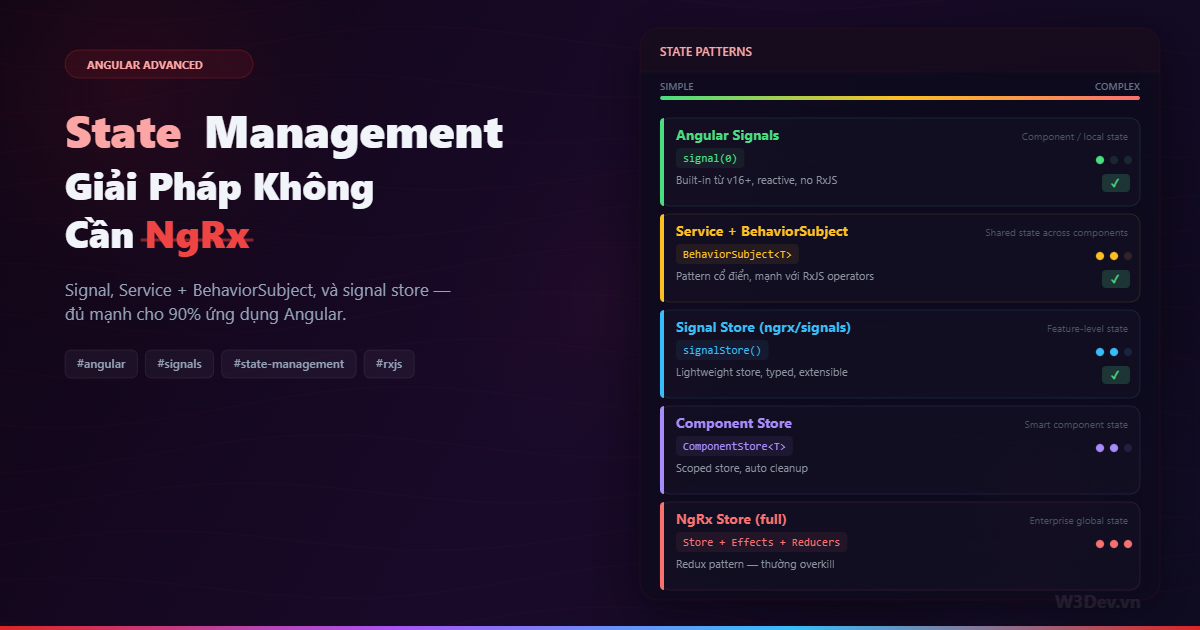
Bài viết này đi qua ba pattern state management không cần NgRx Store đầy đủ — từ đơn giản nhất đến phức tạp, kèm theo tiêu chí chọn lựa rõ ràng.
Trước hết: state nằm ở đâu mới quan trọng
Nhiều dev nhảy thẳng vào chọn tool mà quên hỏi câu quan trọng nhất: state này thuộc về ai?
Local state — chỉ component đó dùng. Ví dụ: dropdown đang mở hay đóng, form input đang nhập, tab nào đang active. Không cần share, không cần store. Dùng biến trong component là đủ.
Shared state — nhiều component cần. Ví dụ: thông tin user đang đăng nhập, giỏ hàng, notification list. Cần một nơi tập trung để các component cùng đọc và cập nhật.
Server state — data từ API. Ví dụ: danh sách sản phẩm, chi tiết đơn hàng. Cái này đa phần nên nằm ở service layer, cache hợp lý, và component subscribe khi cần.
Nhét tất cả mọi thứ vào global store là sai lầm phổ biến nhất. Form input value không cần nằm trong global state. Dropdown open/close không cần dispatch action. Phân loại state đúng, chọn tool sẽ dễ hơn nhiều.
Pattern 1: Angular Signals — local và light-shared state
Signals là reactive primitive mới của Angular — đơn giản, đồng bộ, không cần RxJS:
import { Component, signal, computed, effect } from '@angular/core';

@Component({
  selector: 'app-counter',
  template: `
    <p>Count: {{ count() }}</p>
    <p>Double: {{ double() }}</p>
    <button (click)="increment()">+1</button>
    <button (click)="reset()">Reset</button>
  `,
})
export class CounterComponent {
  // signal — reactive value
  count = signal(0);

  // computed — derived state, tự recalculate khi count thay đổi
  double = computed(() => this.count() * 2);

  // effect — side effect khi signal thay đổi
  logger = effect(() => {
    console.log('Count changed:', this.count());
  });

  increment() {
    this.count.update(v => v + 1);
  }

  reset() {
    this.count.set(0);
  }
}
Ba API cốt lõi: signal() tạo reactive value, computed() derive state từ signal khác, effect() chạy side effect khi dependency thay đổi. Không Observable, không subscribe, không unsubscribe, không pipe.
Signal cho shared state đơn giản
Signal không bị giới hạn trong component — đặt nó trong service và inject vào bất kỳ đâu:
// auth.store.ts
import { Injectable, signal, computed } from '@angular/core';

export interface User {
  id: string;
  name: string;
  email: string;
  role: 'admin' | 'user';
}

@Injectable({ providedIn: 'root' })
export class AuthStore {
  // private writable signal
  private _user = signal<User | null>(null);
  private _token = signal<string | null>(null);

  // public readonly — component chỉ đọc, không set trực tiếp
  readonly user = this._user.asReadonly();
  readonly token = this._token.asReadonly();

  // derived state
  readonly isLoggedIn = computed(() => this._user() !== null);
  readonly isAdmin = computed(() => this._user()?.role === 'admin');
  readonly displayName = computed(() => this._user()?.name ?? 'Guest');

  login(user: User, token: string): void {
    this._user.set(user);
    this._token.set(token);
  }

  logout(): void {
    this._user.set(null);
    this._token.set(null);
  }

  updateProfile(partial: Partial<User>): void {
    this._user.update(current => {
      if (!current) return current;
      return { ...current, ...partial };
    });
  }
}
Sử dụng trong component:
@Component({
  template: `
    @if (auth.isLoggedIn()) {
      <span>Xin chào, {{ auth.displayName() }}</span>
      <button (click)="auth.logout()">Logout</button>
    } @else {
      <app-login-form />
    }
  `,
})
export class HeaderComponent {
  auth = inject(AuthStore);
}
Cái hay của asReadonly() — component không thể gọi .set() hay .update() trên signal, chỉ có thể đọc. Mọi mutation đi qua method của store. Đây là encapsulation tốt mà không cần action/reducer boilerplate.
Khi nào dùng Signal?
Dùng signal khi: state đồng bộ, logic đơn giản, không có complex async flow. Auth state, theme preference, UI toggles, form state nhẹ — tất cả phù hợp.
Không dùng signal khi: cần debounce, switchMap, retry, hoặc bất kỳ async operator nào — lúc đó RxJS mạnh hơn.
Pattern 2: Service + BehaviorSubject — shared state với async power
Pattern cổ điển nhất trong Angular và vẫn cực kỳ hiệu quả. BehaviorSubject giữ giá trị hiện tại, emit cho mọi subscriber mới, và kết hợp được với toàn bộ RxJS operators:
// cart.store.ts
import { Injectable } from '@angular/core';
import { BehaviorSubject, map, distinctUntilChanged } from 'rxjs';

export interface CartItem {
  productId: string;
  name: string;
  price: number;
  quantity: number;
}

interface CartState {
  items: CartItem[];
  loading: boolean;
  error: string | null;
}

const initialState: CartState = {
  items: [],
  loading: false,
  error: null,
};

@Injectable({ providedIn: 'root' })
export class CartStore {
  private _state = new BehaviorSubject<CartState>(initialState);

  // selectors — chỉ emit khi giá trị thực sự thay đổi
  readonly items$ = this._state.pipe(
    map(s => s.items),
    distinctUntilChanged()
  );

  readonly loading$ = this._state.pipe(
    map(s => s.loading),
    distinctUntilChanged()
  );

  readonly totalPrice$ = this._state.pipe(
    map(s => s.items.reduce((sum, i) => sum + i.price * i.quantity, 0)),
    distinctUntilChanged()
  );

  readonly itemCount$ = this._state.pipe(
    map(s => s.items.reduce((sum, i) => sum + i.quantity, 0)),
    distinctUntilChanged()
  );

  // snapshot — lấy giá trị hiện tại không cần subscribe
  get snapshot(): CartState {
    return this._state.getValue();
  }

  addItem(item: Omit<CartItem, 'quantity'>): void {
    const current = this.snapshot;
    const existing = current.items.find(i => i.productId === item.productId);

    if (existing) {
      this.updateState({
        items: current.items.map(i =>
          i.productId === item.productId
            ? { ...i, quantity: i.quantity + 1 }
            : i
        ),
      });
    } else {
      this.updateState({
        items: [...current.items, { ...item, quantity: 1 }],
      });
    }
  }

  removeItem(productId: string): void {
    this.updateState({
      items: this.snapshot.items.filter(i => i.productId !== productId),
    });
  }

  updateQuantity(productId: string, quantity: number): void {
    if (quantity <= 0) {
      this.removeItem(productId);
      return;
    }
    this.updateState({
      items: this.snapshot.items.map(i =>
        i.productId === productId ? { ...i, quantity } : i
      ),
    });
  }

  clear(): void {
    this.updateState({ items: [], error: null });
  }

  // helper — merge partial state
  private updateState(partial: Partial<CartState>): void {
    this._state.next({ ...this.snapshot, ...partial });
  }
}
Pattern này có vài ưu điểm rõ ràng so với signal cho state phức tạp hơn:
distinctUntilChanged() — selector chỉ emit khi giá trị thực sự thay đổi, tránh component re-render vô ích. Signal cũng làm được nhưng với computed. Tuy nhiên, khi cần combine nhiều async source — ví dụ cart items kết hợp với promotion API — RxJS pipe mạnh hơn nhiều.
snapshot pattern — getValue() cho phép đọc state hiện tại mà không cần subscribe. Rất hữu ích trong method mutation khi cần biết state hiện tại để tính state mới.
Kết hợp với API call
Đây là lúc BehaviorSubject tỏa sáng — handle async flow tự nhiên:
// product.store.ts
@Injectable({ providedIn: 'root' })
export class ProductStore {
  private _state = new BehaviorSubject<ProductState>({
    products: [],
    loading: false,
    error: null,
    filters: { category: null, minPrice: 0, maxPrice: Infinity },
  });

  readonly products$ = this._state.pipe(map(s => s.products), distinctUntilChanged());
  readonly loading$ = this._state.pipe(map(s => s.loading), distinctUntilChanged());
  readonly error$ = this._state.pipe(map(s => s.error), distinctUntilChanged());

  // derived: filtered products
  readonly filteredProducts$ = this._state.pipe(
    map(s => {
      return s.products.filter(p => {
        if (s.filters.category && p.category !== s.filters.category) return false;
        if (p.price < s.filters.minPrice || p.price > s.filters.maxPrice) return false;
        return true;
      });
    }),
    distinctUntilChanged()
  );

  constructor(private http: HttpClient) {}

  loadProducts(): void {
    this.updateState({ loading: true, error: null });

    this.http.get<Product[]>('/api/products').pipe(
      retry({ count: 2, delay: 1000 }),
      catchError(err => {
        this.updateState({ loading: false, error: 'Không thể tải sản phẩm.' });
        return EMPTY;
      })
    ).subscribe(products => {
      this.updateState({ products, loading: false });
    });
  }

  setFilters(filters: Partial<ProductFilters>): void {
    this.updateState({
      filters: { ...this.snapshot.filters, ...filters },
    });
  }

  private get snapshot() { return this._state.getValue(); }
  private updateState(p: Partial<ProductState>) {
    this._state.next({ ...this.snapshot, ...p });
  }
}
retry, catchError, switchMap, debounceTime — toàn bộ RxJS operators có sẵn. Nếu cần search với debounce, distinctUntilChanged rồi switchMap sang API call — viết một dòng pipe thay vì tạo Effect class.
Tránh memory leak
BehaviorSubject cần được subscribe — component phải unsubscribe khi destroy. Có vài cách:
// Cách 1: async pipe — tự unsubscribe
@Component({
  template: `
    @for (item of items$ | async; track item.productId) {
      <app-cart-item [item]="item" />
    }
  `,
})
export class CartComponent {
  items$ = inject(CartStore).items$;
}

// Cách 2: takeUntilDestroyed (Angular 16+)
export class CartComponent implements OnInit {
  private store = inject(CartStore);
  private destroyRef = inject(DestroyRef);
  items: CartItem[] = [];

  ngOnInit() {
    this.store.items$.pipe(
      takeUntilDestroyed(this.destroyRef)
    ).subscribe(items => {
      this.items = items;
      // side effect nào đó
    });
  }
}

// Cách 3: toSignal — convert Observable thành Signal
export class CartComponent {
  private store = inject(CartStore);
  items = toSignal(this.store.items$, { initialValue: [] });
  // dùng trong template: {{ items() }}
}
toSignal() là bridge tuyệt vời — giữ store dùng BehaviorSubject (mạnh cho async) nhưng component dùng signal (đơn giản cho template). Tự unsubscribe khi component destroy.
Pattern 3: Signal Store (@ngrx/signals) — khi cần cấu trúc hơn
Từ NgRx 17, team NgRx release @ngrx/signals — lightweight store dựa trên Angular Signals, không cần actions, reducers, hay effects kiểu cũ:
npm install @ngrx/signals
// todo.store.ts
import {
  signalStore,
  withState,
  withComputed,
  withMethods,
  patchState,
} from '@ngrx/signals';
import { computed, inject } from '@angular/core';
import { HttpClient } from '@angular/common/http';
import { rxMethod } from '@ngrx/signals/rxjs-interop';
import { pipe, switchMap, tap } from 'rxjs';

interface Todo {
  id: number;
  title: string;
  completed: boolean;
}

interface TodoState {
  todos: Todo[];
  loading: boolean;
  filter: 'all' | 'active' | 'completed';
}

const initialState: TodoState = {
  todos: [],
  loading: false,
  filter: 'all',
};

export const TodoStore = signalStore(
  { providedIn: 'root' },

  // state
  withState(initialState),

  // computed (derived state)
  withComputed((store) => ({
    filteredTodos: computed(() => {
      const todos = store.todos();
      const filter = store.filter();
      switch (filter) {
        case 'active': return todos.filter(t => !t.completed);
        case 'completed': return todos.filter(t => t.completed);
        default: return todos;
      }
    }),
    completedCount: computed(() =>
      store.todos().filter(t => t.completed).length
    ),
    remainingCount: computed(() =>
      store.todos().filter(t => !t.completed).length
    ),
  })),

  // methods (mutations + side effects)
  withMethods((store, http = inject(HttpClient)) => ({
    setFilter(filter: 'all' | 'active' | 'completed') {
      patchState(store, { filter });
    },

    addTodo(title: string) {
      const newTodo: Todo = {
        id: Date.now(),
        title,
        completed: false,
      };
      patchState(store, { todos: [...store.todos(), newTodo] });
    },

    toggleTodo(id: number) {
      patchState(store, {
        todos: store.todos().map(t =>
          t.id === id ? { ...t, completed: !t.completed } : t
        ),
      });
    },

    removeTodo(id: number) {
      patchState(store, {
        todos: store.todos().filter(t => t.id !== id),
      });
    },

    // async method với rxMethod
    loadTodos: rxMethod<void>(
      pipe(
        tap(() => patchState(store, { loading: true })),
        switchMap(() =>
          http.get<Todo[]>('/api/todos').pipe(
            tap(todos => patchState(store, { todos, loading: false })),
          )
        )
      )
    ),
  }))
);
Sử dụng trong component:
@Component({
  selector: 'app-todo-list',
  providers: [TodoStore], // scoped — hoặc bỏ nếu dùng providedIn: 'root'
  template: `
    <div class="filters">
      <button (click)="store.setFilter('all')"
              [class.active]="store.filter() === 'all'">
        All
      </button>
      <button (click)="store.setFilter('active')">
        Active ({{ store.remainingCount() }})
      </button>
      <button (click)="store.setFilter('completed')">
        Completed ({{ store.completedCount() }})
      </button>
    </div>

    @if (store.loading()) {
      <app-spinner />
    }

    @for (todo of store.filteredTodos(); track todo.id) {
      <div class="todo-item" [class.done]="todo.completed">
        <input type="checkbox"
               [checked]="todo.completed"
               (change)="store.toggleTodo(todo.id)" />
        <span>{{ todo.title }}</span>
        <button (click)="store.removeTodo(todo.id)">×</button>
      </div>
    }
  `,
})
export class TodoListComponent implements OnInit {
  store = inject(TodoStore);

  ngOnInit() {
    this.store.loadTodos();
  }
}
So với NgRx Store đầy đủ — không action, không reducer file riêng, không effect class. Tất cả nằm trong một file duy nhất. Nhưng vẫn có cấu trúc rõ ràng: state, computed, methods tách biệt.
Signal Store với entities
Nếu state là collection (danh sách items), @ngrx/signals/entities giúp CRUD operations gọn hơn nhiều:
import { signalStore, withMethods } from '@ngrx/signals';
import {
  withEntities,
  addEntity,
  updateEntity,
  removeEntity,
  setAllEntities,
} from '@ngrx/signals/entities';

interface Product {
  id: string;
  name: string;
  price: number;
  stock: number;
}

export const ProductStore = signalStore(
  { providedIn: 'root' },

  withEntities<Product>(),

  withMethods((store) => ({
    loadProducts(products: Product[]) {
      setAllEntities(store, products);  // replace all
    },
    addProduct(product: Product) {
      addEntity(store, product);
    },
    updateStock(id: string, stock: number) {
      updateEntity(store, { id, changes: { stock } });
    },
    removeProduct(id: string) {
      removeEntity(store, id);
    },
  }))
);

// trong component:
// store.entities()     → Product[]
// store.ids()          → string[]
// store.entityMap()    → Record<string, Product>
Không cần viết immutable update bằng tay — updateEntity lo hết. Kiểu như mini-database trong frontend.
So sánh ba pattern
                    Signal          BehaviorSubject     Signal Store
─────────────────────────────────────────────────────────────────────
Complexity          Thấp            Trung bình          Trung bình
Boilerplate         Rất ít          Ít                  Ít
Async support       Cơ bản          Mạnh (RxJS)         Tốt (rxMethod)
DevTools            Không           Không               Có plugin
Type safety         Tốt             Tốt                 Rất tốt
Learning curve      Dễ              Cần biết RxJS       Cần biết Signals
Best for            Local/simple    Shared + async      Feature store
─────────────────────────────────────────────────────────────────────
Dùng Signal khi: state đơn giản, sync, ít logic. Auth state, theme, UI preferences, component-level state.
Dùng BehaviorSubject khi: cần RxJS operators (debounce, retry, combine), team đã quen RxJS, cần tương thích với legacy code.
Dùng Signal Store khi: cần cấu trúc hơn Signal thuần nhưng không muốn NgRx full, cần entity management, muốn migration path dễ dàng sang NgRx nếu sau này cần.
Pattern thực tế: kết hợp cả ba
Trong project thật, mình thường dùng cả ba tùy vào context:
// auth → Signal (đơn giản, sync)
@Injectable({ providedIn: 'root' })
export class AuthStore {
  private _user = signal<User | null>(null);
  readonly user = this._user.asReadonly();
  readonly isLoggedIn = computed(() => !!this._user());
  // ...
}

// search → BehaviorSubject (cần debounce + switchMap)
@Injectable({ providedIn: 'root' })
export class SearchStore {
  private _query = new BehaviorSubject('');
  readonly results$ = this._query.pipe(
    debounceTime(300),
    distinctUntilChanged(),
    filter(q => q.length >= 2),
    switchMap(q => this.http.get(`/api/search?q=${q}`)),
    catchError(() => of([]))
  );
  search(query: string) { this._query.next(query); }
}

// product catalog → Signal Store (CRUD, entity, structured)
export const ProductStore = signalStore(
  withEntities<Product>(),
  withComputed(/* filters, aggregations */),
  withMethods(/* loadProducts, updateStock */)
);
Mỗi tool đúng chỗ. Không có rule bắt phải chọn một và chỉ một.
Khi nào thì thực sự cần NgRx Store?
Nói đi cũng phải nói lại. NgRx Store full-blown có giá trị khi:
Undo/redo. NgRx với Redux DevTools cho phép time-travel debugging — quay lại bất kỳ state nào trong quá khứ. Ba pattern trên không support native.
State cực kỳ phức tạp. Hàng chục entity liên kết với nhau, nhiều side effect phụ thuộc lẫn nhau, cần strict separation giữa state mutation và side effect. Enterprise app với 50+ components đọc từ cùng một state tree.
Team lớn cần strict convention. Action log rõ ràng — mọi thay đổi đều có tên, traceable. Khi team 10+ dev cùng đụng vào state, convention chặt giúp tránh chaos.
Offline-first hoặc cần serialize state. Lưu toàn bộ state vào localStorage và restore khi reload — NgRx store serializable by design.
Nếu không rơi vào các case trên, ba pattern trong bài này thừa sức.
Những lỗi hay gặp
Mutate state trực tiếp. Signal và BehaviorSubject đều cần immutable update — push() vào array sẽ không trigger change detection. Luôn spread: [...items, newItem].
// ❌ mutation — UI không update
this.items().push(newItem);

// ✅ immutable — tạo array mới
this.items.update(items => [...items, newItem]);
Subscribe trong component mà quên unsubscribe. BehaviorSubject cần cleanup. Dùng async pipe, takeUntilDestroyed, hoặc toSignal — đừng manual subscribe rồi quên.
Đặt mọi thứ vào global store. Pagination state, form draft, modal open/close — những thứ này thuộc về component, không phải global store. Store chỉ nên chứa state mà nhiều component thật sự cần share.
Gọi API trong computed/signal. Computed phải pure — không side effect, không HTTP call. API call đặt trong method hoặc effect.
Tổng kết
Angular 2026 đã rất khác Angular 2020. Signals thay đổi cuộc chơi — state management đơn giản không còn cần thư viện ngoài. BehaviorSubject vẫn mạnh khi cần async operator. Signal Store là sweet spot giữa simplicity và structure.
Trước khi kéo NgRx vào package.json, tự hỏi: state này cần time-travel debugging không? Cần undo/redo không? Có hơn 20 components cùng đọc từ một state tree không? Nếu câu trả lời đều là không, thì Signal + Service store đủ xài rồi — và team bạn sẽ cảm ơn vì ít boilerplate hơn.

Leave a comment
Your email address will not be published. Required fields are marked *