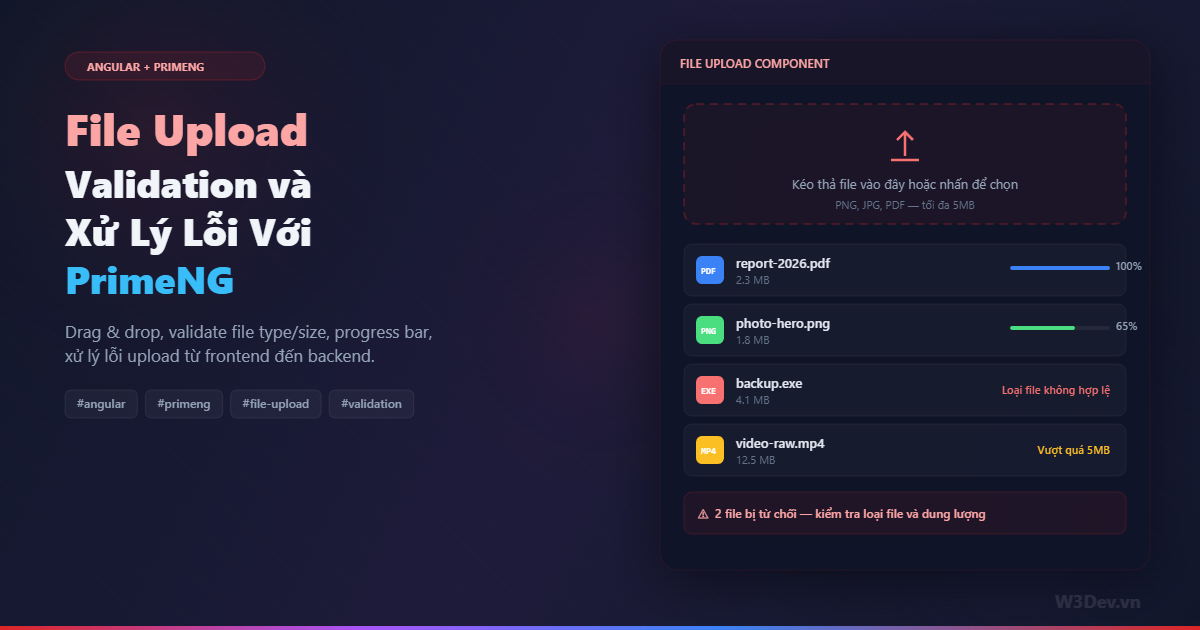
File upload nhìn thì đơn giản — chọn file, bấm gửi, xong. Nhưng ai đã từng làm thực tế sẽ biết nó là một trong những tính năng "dễ làm, khó làm đúng" nhất trong web development. User chọn file 50MB mà server chỉ cho 5MB? File .exe lọt vào server? Upload giữa chừng mất mạng? Progress bar đứng im ở 99%? Toàn bộ những thứ đó cần được handle.
Bài viết này đi qua cách mình build file upload trong Angular dùng PrimeNG FileUpload component, kèm đầy đủ validation phía client, xử lý lỗi phía server, và những edge case mà ít tutorial nào đề cập.
Tại sao PrimeNG?
Angular có sẵn HttpClient để upload file, nhưng bạn sẽ phải tự xây mọi thứ từ đầu: UI drag & drop, progress bar, danh sách file, preview thumbnail, nút xóa từng file. PrimeNG FileUpload cho bạn tất cả out of the box, đồng thời vẫn cho phép custom sâu khi cần.
Mình không nói PrimeNG là lựa chọn duy nhất — ngx-file-drop, ng2-file-upload đều là những alternative tốt. Nhưng nếu project đã dùng PrimeNG cho UI thì không có lý do gì để kéo thêm dependency khác.
Setup cơ bản
Cài PrimeNG nếu chưa có:
npm install primeng primeicons
Import module:
// app.module.ts hoặc standalone component imports
import { FileUploadModule } from 'primeng/fileupload';
import { ToastModule } from 'primeng/toast';
import { MessageService } from 'primeng/api';

@NgModule({
  imports: [FileUploadModule, ToastModule],
  providers: [MessageService],
})
export class AppModule {}
Component cơ bản nhất:
<p-fileUpload
  name="files"
  url="https://api.example.com/upload"
  [multiple]="true"
  accept="image/*,.pdf"
  [maxFileSize]="5000000"
  (onUpload)="onUploadSuccess($event)"
  (onError)="onUploadError($event)">
</p-fileUpload>
Chạy được rồi — nhưng đây mới chỉ là bề nổi. Vấn đề nằm ở những thứ mà config mặc định không cover.
Validation phía client
File type validation
Attribute accept chỉ giới hạn file picker dialog — nó không thực sự ngăn user upload file sai type. User hoàn toàn có thể đổi extension file từ .exe thành .jpg rồi upload. Nên bạn cần validate thêm bằng code:
// file-upload.component.ts
import { Component } from '@angular/core';
import { MessageService } from 'primeng/api';

interface FileValidationError {
  file: File;
  reason: string;
}

@Component({
  selector: 'app-file-upload',
  templateUrl: './file-upload.component.html',
})
export class FileUploadComponent {
  allowedTypes = [
    'image/jpeg',
    'image/png',
    'image/webp',
    'application/pdf',
  ];

  allowedExtensions = ['.jpg', '.jpeg', '.png', '.webp', '.pdf'];
  maxSize = 5 * 1024 * 1024; // 5MB
  maxFiles = 10;
  rejectedFiles: FileValidationError[] = [];

  constructor(private messageService: MessageService) {}

  onSelect(event: any): void {
    this.rejectedFiles = [];

    for (const file of event.files) {
      const errors = this.validateFile(file);
      if (errors.length > 0) {
        this.rejectedFiles.push({
          file,
          reason: errors.join(', '),
        });
      }
    }

    if (this.rejectedFiles.length > 0) {
      this.messageService.add({
        severity: 'warn',
        summary: 'File bị từ chối',
        detail: `${this.rejectedFiles.length} file không hợp lệ`,
        life: 5000,
      });
    }
  }

  private validateFile(file: File): string[] {
    const errors: string[] = [];

    // check MIME type
    if (!this.allowedTypes.includes(file.type)) {
      errors.push(`Loại file "${file.type || 'không xác định'}" không được hỗ trợ`);
    }

    // check extension (phòng trường hợp MIME type bị fake)
    const ext = '.' + file.name.split('.').pop()?.toLowerCase();
    if (!this.allowedExtensions.includes(ext)) {
      errors.push(`Extension "${ext}" không được phép`);
    }

    // check size
    if (file.size > this.maxSize) {
      const sizeMB = (file.size / 1024 / 1024).toFixed(1);
      errors.push(`Dung lượng ${sizeMB}MB vượt quá giới hạn 5MB`);
    }

    // check file name — tránh path traversal
    if (file.name.includes('..') || file.name.includes('/') || file.name.includes('\\')) {
      errors.push('Tên file chứa ký tự không hợp lệ');
    }

    return errors;
  }
}
Lưu ý cái check cuối cùng — file.name.includes('..'). Đây là bảo vệ cơ bản chống path traversal attack. User có thể craft tên file kiểu ../../etc/passwd để cố ghi đè file trên server. Validate ở client là tầng đầu tiên, nhưng server cũng phải validate lại.
Validate bằng magic bytes
MIME type do browser tự detect dựa trên extension, nên nó có thể bị fake. Nếu bạn cần bảo mật cao (upload avatar, document nội bộ), validate thêm bằng magic bytes — vài byte đầu tiên của file cho biết format thực sự:
private async validateMagicBytes(file: File): Promise<boolean> {
  const signatures: Record<string, number[][]> = {
    'image/jpeg': [[0xFF, 0xD8, 0xFF]],
    'image/png': [[0x89, 0x50, 0x4E, 0x47]],
    'application/pdf': [[0x25, 0x50, 0x44, 0x46]], // %PDF
  };

  const allowedSigs = signatures[file.type];
  if (!allowedSigs) return false;

  const buffer = await file.slice(0, 4).arrayBuffer();
  const bytes = new Uint8Array(buffer);

  return allowedSigs.some((sig) =>
    sig.every((byte, i) => bytes[i] === byte)
  );
}

// sử dụng trong validateFile
async validateFileAsync(file: File): Promise<string[]> {
  const errors = this.validateFile(file); // sync checks

  const validMagic = await this.validateMagicBytes(file);
  if (!validMagic) {
    errors.push('Nội dung file không khớp với định dạng khai báo');
  }

  return errors;
}
Ví dụ: user đổi malware.exe thành cute-cat.jpg, browser sẽ báo MIME type là image/jpeg dựa trên extension, nhưng magic bytes sẽ không khớp vì nội dung file thực sự là PE executable chứ không phải JPEG.
Template với custom UI
PrimeNG FileUpload hỗ trợ custom template, cho phép bạn thay đổi hoàn toàn giao diện mà vẫn giữ logic upload:
<!-- file-upload.component.html -->
<p-toast></p-toast>

<p-fileUpload
  #fileUpload
  name="files"
  [url]="uploadUrl"
  [multiple]="true"
  [accept]="allowedExtensions.join(',')"
  [maxFileSize]="maxSize"
  [fileLimit]="maxFiles"
  [auto]="false"
  (onSelect)="onSelect($event)"
  (onUpload)="onUploadSuccess($event)"
  (onError)="onUploadError($event)"
  (onProgress)="onProgress($event)"
  (onRemove)="onRemove($event)">

  <!-- Custom header -->
  <ng-template pTemplate="toolbar">
    <div class="upload-toolbar">
      <span class="file-count">
        {{ fileUpload.files?.length || 0 }} / {{ maxFiles }} file
      </span>
    </div>
  </ng-template>

  <!-- Custom content / drop zone -->
  <ng-template pTemplate="content" let-files let-uploadedFiles="uploadedFiles"
               let-removeFileCallback="removeFileCallback"
               let-removeUploadedFileCallback="removeUploadedFileCallback">

    <!-- Drop zone khi chưa có file -->
    <div
      *ngIf="files.length === 0 && uploadedFiles.length === 0"
      class="drop-zone">
      <i class="pi pi-cloud-upload drop-icon"></i>
      <p class="drop-text">Kéo thả file vào đây</p>
      <p class="drop-hint">
        PNG, JPG, PDF — tối đa {{ maxSize / 1024 / 1024 }}MB mỗi file
      </p>
    </div>

    <!-- Danh sách file đã chọn -->
    <div class="file-list">
      <div
        *ngFor="let file of files; let i = index"
        class="file-item"
        [class.file-error]="isRejected(file)">

        <!-- Thumbnail preview cho ảnh -->
        <img
          *ngIf="file.type?.startsWith('image/')"
          [src]="getPreviewUrl(file)"
          class="file-thumb"
          alt="preview" />
        <div
          *ngIf="!file.type?.startsWith('image/')"
          class="file-icon">
          {{ getExtension(file) }}
        </div>

        <div class="file-info">
          <span class="file-name">{{ file.name }}</span>
          <span class="file-size">{{ formatSize(file.size) }}</span>
          <span
            *ngIf="isRejected(file)"
            class="file-error-text">
            {{ getRejectionReason(file) }}
          </span>
        </div>

        <!-- Progress bar -->
        <div
          *ngIf="uploadProgress[file.name] !== undefined"
          class="file-progress">
          <div
            class="progress-bar"
            [style.width.%]="uploadProgress[file.name]">
          </div>
          <span class="progress-text">
            {{ uploadProgress[file.name] }}%
          </span>
        </div>

        <button
          class="file-remove"
          (click)="removeFileCallback(i)"
          pTooltip="Xóa file">
          <i class="pi pi-times"></i>
        </button>
      </div>
    </div>

    <!-- Rejected files summary -->
    <div *ngIf="rejectedFiles.length > 0" class="rejected-summary">
      <i class="pi pi-exclamation-triangle"></i>
      <span>
        {{ rejectedFiles.length }} file bị từ chối.
        Kiểm tra loại file và dung lượng.
      </span>
    </div>
  </ng-template>
</p-fileUpload>
Helper methods trong component
uploadProgress: Record<string, number> = {};
uploadUrl = '/api/files/upload';

getPreviewUrl(file: File): string {
  return URL.createObjectURL(file);
}

getExtension(file: File): string {
  return file.name.split('.').pop()?.toUpperCase() || '?';
}

formatSize(bytes: number): string {
  if (bytes < 1024) return bytes + ' B';
  if (bytes < 1024 * 1024) return (bytes / 1024).toFixed(1) + ' KB';
  return (bytes / 1024 / 1024).toFixed(1) + ' MB';
}

isRejected(file: File): boolean {
  return this.rejectedFiles.some((r) => r.file.name === file.name);
}

getRejectionReason(file: File): string {
  return this.rejectedFiles.find((r) => r.file.name === file.name)?.reason || '';
}

onProgress(event: any): void {
  // PrimeNG gửi progress cho toàn bộ batch
  // nếu cần per-file progress, dùng custom upload (phần dưới)
  this.uploadProgress['_batch'] = event.progress;
}

onRemove(event: any): void {
  this.rejectedFiles = this.rejectedFiles.filter(
    (r) => r.file.name !== event.file.name
  );
}

onUploadSuccess(event: any): void {
  this.messageService.add({
    severity: 'success',
    summary: 'Upload thành công',
    detail: `${event.files.length} file đã được tải lên`,
  });
}

onUploadError(event: any): void {
  // xử lý chi tiết ở phần dưới
}
Custom Upload với HttpClient
PrimeNG mặc định tự gửi request khi bạn set url. Nhưng trong thực tế, bạn thường cần kiểm soát nhiều hơn: thêm auth header, upload từng file riêng với progress riêng, retry khi fail, hoặc gọi API khác sau khi upload xong.
Dùng customUpload mode:
<p-fileUpload
  #fileUpload
  [customUpload]="true"
  (uploadHandler)="onCustomUpload($event)"
  ...>
</p-fileUpload>
// file-upload.component.ts
import { HttpClient, HttpEventType, HttpErrorResponse } from '@angular/common/http';
import { forkJoin, of, Subject } from 'rxjs';
import { catchError, finalize, takeUntil } from 'rxjs/operators';

export class FileUploadComponent {
  private cancelUpload$ = new Subject<void>();
  isUploading = false;

  constructor(
    private http: HttpClient,
    private messageService: MessageService
  ) {}

  async onCustomUpload(event: { files: File[] }): Promise<void> {
    // filter ra file hợp lệ
    const validFiles: File[] = [];
    for (const file of event.files) {
      const errors = await this.validateFileAsync(file);
      if (errors.length === 0) validFiles.push(file);
    }

    if (validFiles.length === 0) {
      this.messageService.add({
        severity: 'error',
        summary: 'Không có file hợp lệ',
        detail: 'Tất cả file đã bị từ chối do không đạt yêu cầu.',
      });
      return;
    }

    this.isUploading = true;

    // upload từng file riêng để có progress riêng
    const uploads = validFiles.map((file) => this.uploadSingleFile(file));

    forkJoin(uploads)
      .pipe(
        finalize(() => (this.isUploading = false)),
        takeUntil(this.cancelUpload$)
      )
      .subscribe({
        next: (results) => {
          const succeeded = results.filter((r) => r.success).length;
          const failed = results.filter((r) => !r.success).length;

          if (failed === 0) {
            this.messageService.add({
              severity: 'success',
              summary: 'Upload hoàn tất',
              detail: `${succeeded} file đã tải lên thành công.`,
            });
          } else {
            this.messageService.add({
              severity: 'warn',
              summary: 'Upload một phần',
              detail: `${succeeded} thành công, ${failed} thất bại.`,
            });
          }
        },
      });
  }

  private uploadSingleFile(file: File) {
    const formData = new FormData();
    formData.append('file', file, file.name);

    return this.http
      .post<{ url: string }>('/api/files/upload', formData, {
        reportProgress: true,
        observe: 'events',
      })
      .pipe(
        takeUntil(this.cancelUpload$),
        catchError((error: HttpErrorResponse) => {
          this.handleUploadError(file, error);
          return of({ success: false, file: file.name });
        }),
        // convert HttpEvents thành kết quả cuối cùng
        finalize(() => {}),
        // scan qua events để cập nhật progress
      )
      .subscribe({
        next: (event: any) => {
          if (event.type === HttpEventType.UploadProgress) {
            const pct = event.total
              ? Math.round((100 * event.loaded) / event.total)
              : 0;
            this.uploadProgress[file.name] = pct;
          }

          if (event.type === HttpEventType.Response) {
            this.uploadProgress[file.name] = 100;
          }
        },
      });

    // simplified — trả về observable result
    // production code nên dùng scan + last operator
  }

  cancelAll(): void {
    this.cancelUpload$.next();
    this.isUploading = false;
    this.uploadProgress = {};
    this.messageService.add({
      severity: 'info',
      summary: 'Đã hủy upload',
    });
  }
}
Pattern takeUntil(this.cancelUpload$) cho phép user hủy toàn bộ upload đang chạy bằng một nút Cancel. Khi cancelUpload$ emit, tất cả HTTP request đang pending sẽ bị abort — browser thực sự cancel request chứ không phải chỉ ignore response.
Xử lý lỗi chi tiết
Đây là phần quan trọng nhất và cũng bị bỏ qua nhiều nhất. Có rất nhiều kiểu lỗi có thể xảy ra khi upload:
private handleUploadError(file: File, error: HttpErrorResponse): void {
  let message: string;

  switch (error.status) {
    case 0:
      // network error — mất kết nối
      message = 'Mất kết nối mạng. Kiểm tra internet và thử lại.';
      break;

    case 400:
      // server từ chối file — parse error message
      message = this.parseServerError(error) || 'File không hợp lệ.';
      break;

    case 401:
    case 403:
      message = 'Bạn không có quyền upload file. Vui lòng đăng nhập lại.';
      break;

    case 413:
      // Request Entity Too Large — file quá lớn cho server
      message = `File "${file.name}" quá lớn. Server chỉ chấp nhận tối đa 5MB.`;
      break;

    case 415:
      // Unsupported Media Type
      message = `Server không hỗ trợ định dạng file "${file.name}".`;
      break;

    case 429:
      // Too Many Requests
      message = 'Bạn đang upload quá nhanh. Vui lòng đợi một chút.';
      break;

    case 500:
    case 502:
    case 503:
      message = 'Server đang gặp sự cố. Vui lòng thử lại sau.';
      break;

    default:
      message = `Lỗi không xác định (${error.status}). Vui lòng thử lại.`;
  }

  this.messageService.add({
    severity: 'error',
    summary: `Upload thất bại: ${file.name}`,
    detail: message,
    life: 8000,
    sticky: error.status === 0, // network error → sticky notification
  });
}

private parseServerError(error: HttpErrorResponse): string | null {
  try {
    if (typeof error.error === 'string') return error.error;
    if (error.error?.message) return error.error.message;
    if (error.error?.errors) {
      // ASP.NET validation errors format
      return Object.values(error.error.errors).flat().join('. ');
    }
    return null;
  } catch {
    return null;
  }
}
Cái switch dài nhưng mỗi case đều có lý do tồn tại. Lỗi 413 là ví dụ điển hình: bạn validate 5MB ở client, nhưng server config maxAllowedContentLength chỉ 2MB — file 3MB pass client validation nhưng server reject. Nếu không handle riêng, user chỉ thấy "upload failed" mà không biết tại sao.
Lỗi status 0 là network error — WiFi mất, VPN disconnect, hoặc server unreachable. Đây là lỗi hay gặp nhất trên mobile, nên mình set sticky: true để notification không tự biến mất.
Retry logic
Mất mạng giữa chừng là chuyện thường. Thay vì bắt user chọn file lại từ đầu, implement retry:
import { retry, timer } from 'rxjs';

private uploadWithRetry(file: File) {
  const formData = new FormData();
  formData.append('file', file, file.name);

  return this.http
    .post('/api/files/upload', formData, {
      reportProgress: true,
      observe: 'events',
    })
    .pipe(
      retry({
        count: 3,
        delay: (error, retryCount) => {
          // chỉ retry với network error hoặc 5xx
          if (error.status !== 0 && error.status < 500) {
            throw error; // không retry 4xx
          }
          // exponential backoff: 1s, 2s, 4s
          const delayMs = Math.pow(2, retryCount - 1) * 1000;
          console.warn(
            `Upload "${file.name}" failed, retry ${retryCount}/3 in ${delayMs}ms`
          );
          return timer(delayMs);
        },
      }),
      catchError((error) => {
        this.handleUploadError(file, error);
        return of({ success: false });
      })
    );
}
Quan trọng: chỉ retry với lỗi có khả năng recover — network error (status 0) và server error (5xx). Không retry 4xx vì đó là lỗi client, gửi lại bao nhiêu lần cũng giống nhau.
Backend .NET: nhận file
Cho đầy đủ, đây là phía server để nhận file:
[ApiController]
[Route("api/files")]
public class FileUploadController : ControllerBase
{
    private readonly string[] _allowedExtensions = { ".jpg", ".jpeg", ".png", ".webp", ".pdf" };
    private readonly string[] _allowedMimeTypes = { "image/jpeg", "image/png", "image/webp", "application/pdf" };
    private const long MaxFileSize = 5 * 1024 * 1024;
    private readonly ILogger<FileUploadController> _logger;

    public FileUploadController(ILogger<FileUploadController> logger)
    {
        _logger = logger;
    }

    [HttpPost("upload")]
    [RequestSizeLimit(10 * 1024 * 1024)] // 10MB request limit
    public async Task<IActionResult> Upload(IFormFile file)
    {
        if (file == null || file.Length == 0)
            return BadRequest(new { message = "Không có file nào được gửi." });

        // validate size
        if (file.Length > MaxFileSize)
            return BadRequest(new { message = $"File vượt quá giới hạn {MaxFileSize / 1024 / 1024}MB." });

        // validate extension
        var ext = Path.GetExtension(file.FileName).ToLowerInvariant();
        if (!_allowedExtensions.Contains(ext))
            return BadRequest(new { message = $"Extension '{ext}' không được hỗ trợ." });

        // validate MIME type
        if (!_allowedMimeTypes.Contains(file.ContentType))
            return BadRequest(new { message = $"Loại file '{file.ContentType}' không được hỗ trợ." });

        // validate magic bytes
        if (!await ValidateMagicBytes(file))
            return BadRequest(new { message = "Nội dung file không khớp với định dạng khai báo." });

        // sanitize filename — QUAN TRỌNG
        var safeFileName = $"{Guid.NewGuid()}{ext}";
        var uploadPath = Path.Combine("uploads", safeFileName);

        await using var stream = new FileStream(uploadPath, FileMode.Create);
        await file.CopyToAsync(stream);

        _logger.LogInformation("File uploaded: {FileName} -> {SavedAs}, Size: {Size}",
            file.FileName, safeFileName, file.Length);

        return Ok(new
        {
            fileName = safeFileName,
            originalName = file.FileName,
            size = file.Length,
            url = $"/files/{safeFileName}"
        });
    }

    private static async Task<bool> ValidateMagicBytes(IFormFile file)
    {
        var signatures = new Dictionary<string, byte[][]>
        {
            ["image/jpeg"] = new[] { new byte[] { 0xFF, 0xD8, 0xFF } },
            ["image/png"] = new[] { new byte[] { 0x89, 0x50, 0x4E, 0x47 } },
            ["application/pdf"] = new[] { new byte[] { 0x25, 0x50, 0x44, 0x46 } },
        };

        if (!signatures.TryGetValue(file.ContentType, out var sigs))
            return false;

        using var reader = new BinaryReader(file.OpenReadStream());
        var headerBytes = reader.ReadBytes(4);

        return sigs.Any(sig =>
            headerBytes.Length >= sig.Length &&
            sig.Select((b, i) => headerBytes[i] == b).All(x => x));
    }
}
Điểm cần chú ý: var safeFileName = $"{Guid.NewGuid()}{ext}" — KHÔNG BAO GIỜ dùng file.FileName gốc để lưu file. User có thể gửi tên file kiểu ../../../etc/crontab hoặc tên chứa ký tự đặc biệt. Luôn generate tên mới bằng GUID.
Attribute [RequestSizeLimit] cũng quan trọng — nếu bạn dùng Kestrel thì nó sẽ reject request quá lớn trước khi code chạy, trả về 413. Nếu dùng IIS, config thêm maxAllowedContentLength trong web.config.
Drag & Drop styling
CSS cho drop zone — phần thường bị bỏ qua nhưng ảnh hưởng nhiều đến UX:
// file-upload.component.scss
.drop-zone {
  border: 2px dashed rgba(148, 163, 184, 0.3);
  border-radius: 12px;
  padding: 48px 24px;
  text-align: center;
  transition: all 0.2s ease;
  cursor: pointer;

  &:hover,
  &.dragover {
    border-color: rgba(59, 130, 246, 0.6);
    background: rgba(59, 130, 246, 0.04);
  }

  .drop-icon {
    font-size: 2.5rem;
    color: #64748b;
    margin-bottom: 12px;
  }
}

.file-item {
  display: flex;
  align-items: center;
  gap: 12px;
  padding: 12px 16px;
  border-radius: 8px;
  background: rgba(255, 255, 255, 0.02);
  border: 1px solid rgba(255, 255, 255, 0.06);
  margin-bottom: 8px;

  &.file-error {
    border-color: rgba(239, 68, 68, 0.3);
    background: rgba(239, 68, 68, 0.04);
  }
}

.file-thumb {
  width: 40px;
  height: 40px;
  border-radius: 6px;
  object-fit: cover;
}

.progress-bar {
  height: 4px;
  background: #3b82f6;
  border-radius: 2px;
  transition: width 0.3s ease;
}

.file-error-text {
  color: #fca5a5;
  font-size: 0.75rem;
}

.rejected-summary {
  display: flex;
  align-items: center;
  gap: 8px;
  padding: 10px 16px;
  border-radius: 8px;
  background: rgba(239, 68, 68, 0.08);
  border: 1px solid rgba(239, 68, 68, 0.2);
  color: #fca5a5;
  font-size: 0.85rem;
  margin-top: 12px;
}
Một chi tiết nhỏ: class .dragover cần được toggle khi user kéo file vào drop zone. PrimeNG handle sẵn phần này, nhưng nếu bạn custom thì cần listen dragenter, dragleave, drop events.
Những lỗi phổ biến
Memory leak với ObjectURL. Mỗi lần gọi URL.createObjectURL(file) sẽ tạo một blob URL trong memory. Nếu không revoke, nó sẽ không được GC cho đến khi page unload. Với 50 file preview, bạn có thể leak hàng trăm MB RAM.
private previewUrls = new Map<string, string>();

getPreviewUrl(file: File): string {
  if (!this.previewUrls.has(file.name)) {
    this.previewUrls.set(file.name, URL.createObjectURL(file));
  }
  return this.previewUrls.get(file.name)!;
}

// cleanup khi component destroy
ngOnDestroy(): void {
  this.previewUrls.forEach((url) => URL.revokeObjectURL(url));
  this.previewUrls.clear();
  this.cancelUpload$.next();
  this.cancelUpload$.complete();
}
Quên unsubscribe. Upload observable chạy lâu — nếu user navigate ra khỏi page mà request vẫn chạy, callback sẽ execute trên component đã destroy, gây lỗi. takeUntil(this.cancelUpload$) ở trên đã xử lý việc này.
Không disable nút upload khi đang upload. User double-click nút Upload sẽ gửi file 2 lần. Luôn disable button và input khi isUploading = true.
Tổng kết
File upload tưởng đơn giản nhưng làm đúng thì cần cover rất nhiều thứ: validate type bằng cả extension lẫn magic bytes, giới hạn size ở cả client lẫn server, sanitize filename phòng path traversal, progress bar per-file, retry với exponential backoff cho network error, xử lý từng loại HTTP error riêng biệt, cleanup memory khi destroy component, và prevent double submission.
PrimeNG FileUpload cho bạn nền tảng UI tốt để bắt đầu, nhưng phần validation và error handling phải tự viết thêm khá nhiều. Hy vọng bài viết này giúp bạn có một checklist đầy đủ để không bỏ sót edge case nào khi đưa lên production.

Leave a comment
Your email address will not be published. Required fields are marked *