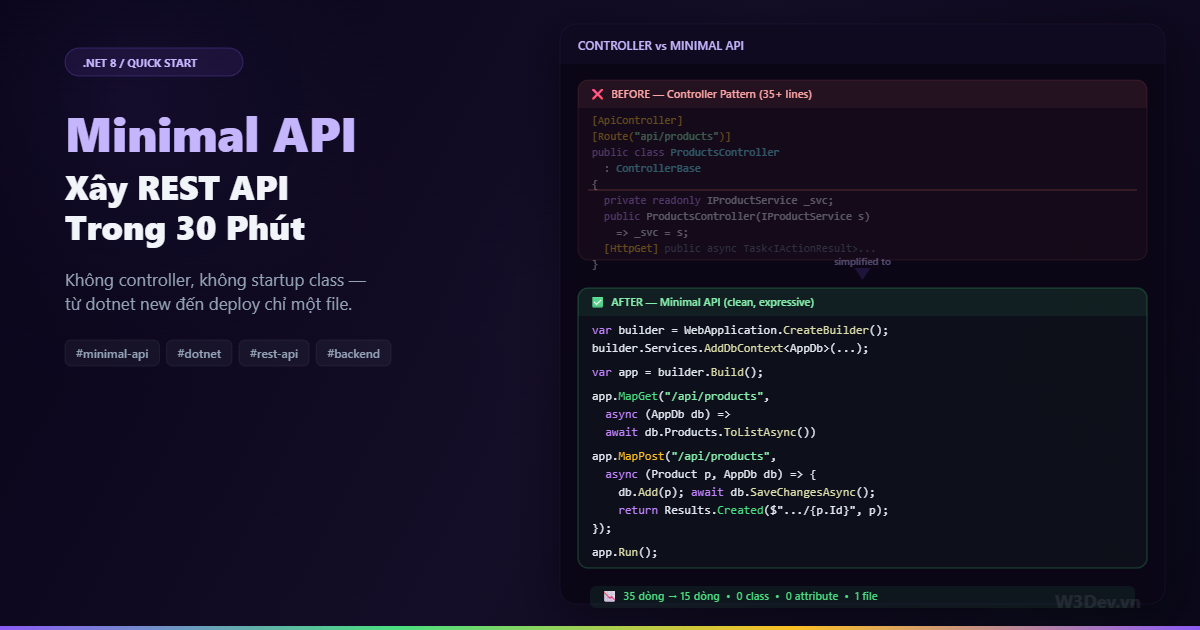
Mình nhớ lần đầu tạo .NET Web API project — Visual Studio generate ra hơn chục file: Startup.cs, Program.cs, WeatherForecastController.cs, WeatherForecast.cs, appsettings.Development.json, launchSettings.json, thư mục Properties, thư mục Controllers. Chưa viết dòng code nào mà project đã 8 file. Tạo thêm một endpoint cần: tạo controller class, kế thừa ControllerBase, thêm [ApiController], thêm [Route], inject service qua constructor, viết method với [HttpGet]. Bốn annotation và một constructor cho mỗi controller.
Minimal API xóa sạch tất cả ceremony đó. Không controller class. Không Startup.cs. Không attribute routing. Một file Program.cs, vài dòng code, API chạy. Mình không nói nó thay thế controller pattern cho mọi project — nhưng cho microservice nhỏ, prototype nhanh, hay API đơn giản, nó nhanh hơn đáng kể.
Bài viết này build một REST API hoàn chỉnh từ đầu bằng Minimal API — CRUD, validation, authentication, error handling, Swagger — trong 30 phút. Clock starts now.
Phút 0-3: Tạo project và chạy
dotnet new web -n ProductApi
cd ProductApi
dotnet new web — không phải webapi. Template web tạo project trống nhất có thể. Mở Program.cs:
var builder = WebApplication.CreateBuilder(args);
var app = builder.Build();

app.MapGet("/", () => "Hello World!");

app.Run();
Bốn dòng. Chạy thử:
dotnet run
# Now listening on: http://localhost:5000
Mở browser http://localhost:5000 — "Hello World!". API đang chạy. Đó là toàn bộ boilerplate bạn cần.
Phút 3-8: Entity, DbContext, Database
Thêm packages:
dotnet add package Npgsql.EntityFrameworkCore.PostgreSQL
dotnet add package Microsoft.EntityFrameworkCore.Design
Tạo entity và DbContext ngay trong Program.cs (hoặc file riêng — tùy bạn, Minimal API không ép cấu trúc):
// Models
public class Product
{
    public int Id { get; set; }
    public string Name { get; set; } = string.Empty;
    public decimal Price { get; set; }
    public string Category { get; set; } = string.Empty;
    public bool IsActive { get; set; } = true;
    public DateTimeOffset CreatedAt { get; set; } = DateTimeOffset.UtcNow;
}

public class AppDb : DbContext
{
    public AppDb(DbContextOptions<AppDb> options) : base(options) { }
    public DbSet<Product> Products => Set<Product>();
}
Đăng ký trong Program.cs:
var builder = WebApplication.CreateBuilder(args);

builder.Services.AddDbContext<AppDb>(options =>
    options.UseNpgsql(builder.Configuration.GetConnectionString("Default")));

var app = builder.Build();
// appsettings.json
{
  "ConnectionStrings": {
    "Default": "Host=localhost;Database=productapi;Username=dev;Password=dev123"
  }
}
Migration:
dotnet ef migrations add Init
dotnet ef database update
Database sẵn sàng. Tổng thời gian: 5 phút.
Phút 8-15: CRUD Endpoints
Đây là phần Minimal API tỏa sáng — mỗi endpoint là một dòng app.MapXxx():
var app = builder.Build();

// GET tất cả products — có filter và pagination
app.MapGet("/api/products", async (
    AppDb db,
    string? category,
    int page = 1,
    int size = 20) =>
{
    var query = db.Products
        .Where(p => p.IsActive)
        .AsNoTracking();

    if (!string.IsNullOrEmpty(category))
        query = query.Where(p => p.Category == category);

    var total = await query.CountAsync();
    var items = await query
        .OrderByDescending(p => p.CreatedAt)
        .Skip((page - 1) * size)
        .Take(size)
        .ToListAsync();

    return Results.Ok(new { data = items, total, page, size });
});

// GET product by ID
app.MapGet("/api/products/{id:int}", async (int id, AppDb db) =>
{
    var product = await db.Products.FindAsync(id);
    return product is not null
        ? Results.Ok(product)
        : Results.NotFound(new { message = $"Product {id} not found" });
});

// POST tạo product mới
app.MapPost("/api/products", async (Product product, AppDb db) =>
{
    product.CreatedAt = DateTimeOffset.UtcNow;
    db.Products.Add(product);
    await db.SaveChangesAsync();
    return Results.Created($"/api/products/{product.Id}", product);
});

// PUT update product
app.MapPut("/api/products/{id:int}", async (int id, Product input, AppDb db) =>
{
    var product = await db.Products.FindAsync(id);
    if (product is null) return Results.NotFound();

    product.Name = input.Name;
    product.Price = input.Price;
    product.Category = input.Category;
    product.IsActive = input.IsActive;

    await db.SaveChangesAsync();
    return Results.Ok(product);
});

// DELETE (soft delete)
app.MapDelete("/api/products/{id:int}", async (int id, AppDb db) =>
{
    var product = await db.Products.FindAsync(id);
    if (product is null) return Results.NotFound();

    product.IsActive = false;
    await db.SaveChangesAsync();
    return Results.NoContent();
});

app.Run();
Năm endpoints. Không class, không inheritance, không attribute. Mỗi endpoint là một lambda nhận dependency qua parameter — AppDb db được DI container inject tự động.
Results.Ok(), Results.NotFound(), Results.Created() — typed result helpers thay IActionResult. Compiler biết return type, Swagger tự infer response schema.
Route constraint {id:int} — chỉ match integer, /api/products/abc trả 404 thay vì chạy endpoint rồi parse fail.
Phút 15-18: Validation
Minimal API không có [Required], [MaxLength] attribute như controller. Dùng FluentValidation hoặc manual — mình prefer manual validation cho API nhỏ, FluentValidation cho lớn.
Manual validation nhanh
// tạo record cho request — tách khỏi entity
public record CreateProductRequest(
    string Name,
    decimal Price,
    string Category);

public record UpdateProductRequest(
    string Name,
    decimal Price,
    string Category,
    bool IsActive);

// validation helper
static class Validate
{
    public static (bool IsValid, string? Error) Product(CreateProductRequest req) =>
        req switch
        {
            { Name: null or "" }     => (false, "Name is required"),
            { Name.Length: > 200 }   => (false, "Name max 200 characters"),
            { Price: <= 0 }          => (false, "Price must be positive"),
            { Category: null or "" } => (false, "Category is required"),
            _                        => (true, null)
        };
}
Dùng trong endpoint:
app.MapPost("/api/products", async (CreateProductRequest req, AppDb db) =>
{
    var (valid, error) = Validate.Product(req);
    if (!valid) return Results.BadRequest(new { message = error });

    var product = new Product
    {
        Name = req.Name,
        Price = req.Price,
        Category = req.Category
    };

    db.Products.Add(product);
    await db.SaveChangesAsync();
    return Results.Created($"/api/products/{product.Id}", product);
});
Pattern matching validation — gọn, đọc hiểu ngay, không cần FluentValidation dependency cho API nhỏ.
FluentValidation cho project lớn hơn
dotnet add package FluentValidation.DependencyInjectionExtensions
public class CreateProductValidator : AbstractValidator<CreateProductRequest>
{
    public CreateProductValidator()
    {
        RuleFor(x => x.Name).NotEmpty().MaximumLength(200);
        RuleFor(x => x.Price).GreaterThan(0);
        RuleFor(x => x.Category).NotEmpty();
    }
}

// đăng ký
builder.Services.AddValidatorsFromAssemblyContaining<Program>();

// validation filter cho tất cả endpoint
app.MapPost("/api/products", async (
    CreateProductRequest req,
    IValidator<CreateProductRequest> validator,
    AppDb db) =>
{
    var result = await validator.ValidateAsync(req);
    if (!result.IsValid)
        return Results.ValidationProblem(result.ToDictionary());

    // ... create product
});
Results.ValidationProblem() trả ProblemDetails chuẩn RFC 7807 — frontend biết parse.
Phút 18-22: Swagger và API Documentation
dotnet add package Swashbuckle.AspNetCore
builder.Services.AddEndpointsApiExplorer();
builder.Services.AddSwaggerGen(options =>
{
    options.SwaggerDoc("v1", new OpenApiInfo
    {
        Title = "Product API",
        Version = "v1",
        Description = "REST API cho quản lý sản phẩm"
    });
});

var app = builder.Build();

if (app.Environment.IsDevelopment())
{
    app.UseSwagger();
    app.UseSwaggerUI();
}
Swagger tự detect Minimal API endpoints — nhưng cần thêm metadata để docs đẹp:
app.MapGet("/api/products", async (...) => { ... })
    .WithName("GetProducts")
    .WithTags("Products")
    .WithSummary("Lấy danh sách sản phẩm")
    .WithDescription("Hỗ trợ filter theo category, pagination.")
    .Produces<object>(StatusCodes.Status200OK)
    .ProducesProblem(StatusCodes.Status400BadRequest);

app.MapGet("/api/products/{id:int}", async (...) => { ... })
    .WithName("GetProductById")
    .WithTags("Products")
    .Produces<Product>(StatusCodes.Status200OK)
    .ProducesProblem(StatusCodes.Status404NotFound);

app.MapPost("/api/products", async (...) => { ... })
    .WithName("CreateProduct")
    .WithTags("Products")
    .Accepts<CreateProductRequest>("application/json")
    .Produces<Product>(StatusCodes.Status201Created)
    .ProducesValidationProblem();
WithTags nhóm endpoint trong Swagger UI. Produces<T> cho Swagger biết response schema. Method chaining thay attribute — cùng thông tin, cú pháp khác.
Phút 22-25: Error Handling và Logging
Global error handler
// trước app.MapXxx()
app.UseExceptionHandler(error =>
{
    error.Run(async context =>
    {
        var exception = context.Features.Get<IExceptionHandlerFeature>()?.Error;
        var logger = context.RequestServices.GetRequiredService<ILogger<Program>>();

        logger.LogError(exception, "Unhandled exception");

        context.Response.StatusCode = StatusCodes.Status500InternalServerError;
        context.Response.ContentType = "application/json";

        await context.Response.WriteAsJsonAsync(new
        {
            status = 500,
            message = "Internal server error",
            traceId = context.TraceIdentifier
        });
    });
});
Request logging
builder.Services.AddHttpLogging(logging =>
{
    logging.LoggingFields = HttpLoggingFields.RequestPath
        | HttpLoggingFields.RequestMethod
        | HttpLoggingFields.ResponseStatusCode
        | HttpLoggingFields.Duration;
});

app.UseHttpLogging();
Mỗi request ghi log: HTTP GET /api/products → 200 in 12ms. Đủ cho development, production thêm Serilog nếu cần structured logging.
Phút 25-28: Authentication
JWT authentication cho Minimal API:
dotnet add package Microsoft.AspNetCore.Authentication.JwtBearer
builder.Services.AddAuthentication(JwtBearerDefaults.AuthenticationScheme)
    .AddJwtBearer(options =>
    {
        options.TokenValidationParameters = new TokenValidationParameters
        {
            ValidateIssuerSigningKey = true,
            IssuerSigningKey = new SymmetricSecurityKey(
                Encoding.UTF8.GetBytes(builder.Configuration["Jwt:Secret"]!)),
            ValidateIssuer = true,
            ValidIssuer = builder.Configuration["Jwt:Issuer"],
            ValidateAudience = false,
            ValidateLifetime = true,
        };
    });

builder.Services.AddAuthorization();

var app = builder.Build();
app.UseAuthentication();
app.UseAuthorization();
Apply auth cho endpoint cụ thể:
// public — ai cũng truy cập
app.MapGet("/api/products", async (...) => { ... });
app.MapGet("/api/products/{id:int}", async (...) => { ... });

// protected — cần JWT token
app.MapPost("/api/products", async (...) => { ... })
    .RequireAuthorization();

app.MapPut("/api/products/{id:int}", async (...) => { ... })
    .RequireAuthorization();

app.MapDelete("/api/products/{id:int}", async (...) => { ... })
    .RequireAuthorization("AdminOnly"); // named policy
.RequireAuthorization() thay [Authorize] attribute. Gắn cuối endpoint chain — đọc ngay biết endpoint nào protected.
Login endpoint tạo JWT
app.MapPost("/api/auth/login", async (LoginRequest req, AppDb db, IConfiguration config) =>
{
    var user = await db.Users
        .FirstOrDefaultAsync(u => u.Email == req.Email);

    if (user is null || !BCrypt.Net.BCrypt.Verify(req.Password, user.PasswordHash))
        return Results.Unauthorized();

    var token = GenerateJwtToken(user, config);
    return Results.Ok(new { token, expiresIn = 3600 });
});

static string GenerateJwtToken(User user, IConfiguration config)
{
    var key = new SymmetricSecurityKey(
        Encoding.UTF8.GetBytes(config["Jwt:Secret"]!));

    var claims = new[]
    {
        new Claim(ClaimTypes.NameIdentifier, user.Id.ToString()),
        new Claim(ClaimTypes.Email, user.Email),
        new Claim(ClaimTypes.Role, user.Role),
    };

    var token = new JwtSecurityToken(
        issuer: config["Jwt:Issuer"],
        claims: claims,
        expires: DateTime.UtcNow.AddHours(1),
        signingCredentials: new SigningCredentials(key, SecurityAlgorithms.HmacSha256));

    return new JwtSecurityTokenHandler().WriteToken(token);
}
Phút 28-30: Tổ chức code khi project lớn lên
Tất cả trong Program.cs ổn cho API nhỏ. Nhưng 500 dòng trong một file thì không. Dùng extension methods để tách:
// Endpoints/ProductEndpoints.cs
public static class ProductEndpoints
{
    public static RouteGroupBuilder MapProductEndpoints(this WebApplication app)
    {
        var group = app.MapGroup("/api/products")
            .WithTags("Products");

        group.MapGet("/", GetAll);
        group.MapGet("/{id:int}", GetById);
        group.MapPost("/", Create).RequireAuthorization();
        group.MapPut("/{id:int}", Update).RequireAuthorization();
        group.MapDelete("/{id:int}", Delete).RequireAuthorization();

        return group;
    }

    private static async Task<IResult> GetAll(
        AppDb db, string? category, int page = 1, int size = 20)
    {
        var query = db.Products.Where(p => p.IsActive).AsNoTracking();
        if (!string.IsNullOrEmpty(category))
            query = query.Where(p => p.Category == category);

        var total = await query.CountAsync();
        var items = await query
            .OrderByDescending(p => p.CreatedAt)
            .Skip((page - 1) * size).Take(size)
            .ToListAsync();

        return Results.Ok(new { data = items, total, page, size });
    }

    private static async Task<IResult> GetById(int id, AppDb db)
    {
        var product = await db.Products.FindAsync(id);
        return product is not null ? Results.Ok(product) : Results.NotFound();
    }

    private static async Task<IResult> Create(
        CreateProductRequest req, AppDb db)
    {
        var (valid, error) = Validate.Product(req);
        if (!valid) return Results.BadRequest(new { message = error });

        var product = new Product
        {
            Name = req.Name, Price = req.Price, Category = req.Category
        };
        db.Products.Add(product);
        await db.SaveChangesAsync();
        return Results.Created($"/api/products/{product.Id}", product);
    }

    private static async Task<IResult> Update(int id, UpdateProductRequest req, AppDb db)
    {
        var product = await db.Products.FindAsync(id);
        if (product is null) return Results.NotFound();

        product.Name = req.Name;
        product.Price = req.Price;
        product.Category = req.Category;
        product.IsActive = req.IsActive;
        await db.SaveChangesAsync();
        return Results.Ok(product);
    }

    private static async Task<IResult> Delete(int id, AppDb db)
    {
        var product = await db.Products.FindAsync(id);
        if (product is null) return Results.NotFound();

        product.IsActive = false;
        await db.SaveChangesAsync();
        return Results.NoContent();
    }
}
Program.cs trở về gọn gàng:
var builder = WebApplication.CreateBuilder(args);

builder.Services.AddDbContext<AppDb>(options =>
    options.UseNpgsql(builder.Configuration.GetConnectionString("Default")));
builder.Services.AddEndpointsApiExplorer();
builder.Services.AddSwaggerGen();
builder.Services.AddAuthentication(/* ... */);
builder.Services.AddAuthorization();

var app = builder.Build();

if (app.Environment.IsDevelopment())
{
    app.UseSwagger();
    app.UseSwaggerUI();
}

app.UseAuthentication();
app.UseAuthorization();

app.MapProductEndpoints();
app.MapAuthEndpoints();

app.Run();
Hai dòng MapXxxEndpoints() thay vì hai controller class. Khi thêm feature mới, tạo file XxxEndpoints.cs + thêm một dòng MapXxxEndpoints(). Convention rõ ràng, mỗi file chứa endpoints của một resource.
MapGroup — share route prefix và filter
var group = app.MapGroup("/api/products").WithTags("Products");
MapGroup gom endpoints chung prefix — tất cả endpoint trong group tự có /api/products prefix. .RequireAuthorization() trên group áp dụng cho toàn bộ:
var admin = app.MapGroup("/api/admin")
    .RequireAuthorization("AdminOnly")
    .WithTags("Admin");

admin.MapGet("/users", GetUsers);        // /api/admin/users — admin only
admin.MapDelete("/users/{id}", DeleteUser); // /api/admin/users/123 — admin only
File cuối cùng hoàn chỉnh
Cấu trúc project sau 30 phút:
ProductApi/
├── Program.cs                  ← DI setup + middleware + map endpoints
├── Models/
│   ├── Product.cs              ← entity
│   ├── AppDb.cs                ← DbContext
│   └── Requests.cs             ← DTOs
├── Endpoints/
│   ├── ProductEndpoints.cs     ← CRUD endpoints
│   └── AuthEndpoints.cs        ← login/register
├── Validation/
│   └── Validate.cs             ← validation helpers
├── appsettings.json
└── ProductApi.csproj
Không thư mục Controllers/. Không Startup.cs. Không Program.Main(). Sạch.
Minimal API vs Controller: khi nào dùng gì?
Chọn Minimal API khi
Microservice nhỏ. 5-15 endpoints, logic đơn giản, CRUD + business logic vừa. Minimal API giảm boilerplate đáng kể — mỗi endpoint rõ ràng, không ceremony.
Prototype / MVP. Cần ship nhanh, validate idea. Setup nhanh hơn controller 5-10 phút, refactor sang controller sau nếu cần.
Serverless function / Lambda. Minimal API boot nhanh hơn controller-based vì ít middleware mặc định. Cold start thấp hơn.
API cho frontend riêng. Backend-for-frontend (BFF) pattern — API nhỏ serve một frontend cụ thể, không cần framework-level features.
Chọn Controller khi
API lớn, nhiều team contribute. Convention rõ ràng — mọi controller cùng structure, dễ onboard dev mới. Minimal API flexible quá đôi khi thành chaos khi team lớn.
Cần filter pipeline phức tạp. Action filter, resource filter, exception filter — controller pipeline mature hơn. Minimal API có endpoint filter từ .NET 7 nhưng ecosystem nhỏ hơn.
Cần model binding phức tạp. [FromBody], [FromQuery], [FromRoute], [FromHeader], custom model binder — controller hỗ trợ sâu hơn. Minimal API có nhưng ít linh hoạt.
Đã có codebase controller. Không refactor cả project chỉ vì Minimal API cool. Mix được — controller và minimal endpoint chung sống trong cùng project.
Mix cả hai
var app = builder.Build();

// Minimal API cho simple endpoints
app.MapGet("/health", () => Results.Ok(new { status = "healthy" }));
app.MapGet("/version", () => Results.Ok(new { version = "1.0.0" }));
app.MapProductEndpoints(); // simple CRUD

// Controller cho complex endpoints
app.MapControllers(); // OrdersController, ReportsController
Hoàn toàn hợp lệ. Health check, version, simple CRUD dùng Minimal API. Complex business logic với nhiều filter dùng controller.
TypedResults — type-safe hơn Results
Từ .NET 7, TypedResults cho Swagger infer response type chính xác:
// Results — Swagger không biết chắc response type
app.MapGet("/api/products/{id}", async (int id, AppDb db) =>
{
    var p = await db.Products.FindAsync(id);
    return p is not null ? Results.Ok(p) : Results.NotFound();
});
// Swagger: response type = ???

// TypedResults — compiler + Swagger biết chính xác
app.MapGet("/api/products/{id}", async Task<Results<Ok<Product>, NotFound>> (int id, AppDb db) =>
{
    var p = await db.Products.FindAsync(id);
    return p is not null
        ? TypedResults.Ok(p)
        : TypedResults.NotFound();
});
// Swagger: 200 = Product, 404 = empty — tự detect, không cần .Produces<>()
Return type Results<Ok<Product>, NotFound> nói rõ: endpoint này trả 200 với Product hoặc 404 rỗng. Compiler enforce — bạn không thể return TypedResults.BadRequest() nếu không khai báo trong union type. Type safety + Swagger accuracy trong cùng một cú pháp.
Verbose hơn Results, nhưng đáng cho API public mà Swagger docs cần chính xác.
Endpoint Filter — middleware cho từng endpoint
// validation filter — chạy trước endpoint handler
public class ValidationFilter<T> : IEndpointFilter where T : class
{
    public async ValueTask<object?> InvokeAsync(
        EndpointFilterInvocationContext ctx,
        EndpointFilterDelegate next)
    {
        var validator = ctx.HttpContext.RequestServices
            .GetService<IValidator<T>>();

        if (validator is null) return await next(ctx);

        var arg = ctx.Arguments.OfType<T>().FirstOrDefault();
        if (arg is null) return await next(ctx);

        var result = await validator.ValidateAsync(arg);
        if (!result.IsValid)
            return Results.ValidationProblem(result.ToDictionary());

        return await next(ctx);
    }
}

// apply
app.MapPost("/api/products", async (CreateProductRequest req, AppDb db) =>
{
    // không cần validate ở đây — filter đã xử lý
    var product = new Product { Name = req.Name, Price = req.Price, Category = req.Category };
    db.Products.Add(product);
    await db.SaveChangesAsync();
    return Results.Created($"/api/products/{product.Id}", product);
})
.AddEndpointFilter<ValidationFilter<CreateProductRequest>>();
Filter chạy trước handler — giống action filter của controller. Tách validation ra khỏi business logic, reusable cho mọi endpoint.
Performance vs Controller
Benchmark thực tế (BenchmarkDotNet, .NET 8, simple GET endpoint):
                    Requests/sec    Avg Latency    Memory
─────────────────────────────────────────────────────────
Minimal API         145,000         0.69ms         2.1 KB/req
Controller API      138,000         0.72ms         2.4 KB/req
Sai biệt ~5%. Minimal API nhanh hơn chút nhờ ít middleware trong pipeline — nhưng real-world bottleneck là database, not framework overhead. Đừng chọn Minimal API vì performance — chọn vì developer experience.
Tổng kết
30 phút, từ dotnet new đến API hoàn chỉnh: 5 CRUD endpoints, validation, JWT authentication, Swagger docs, error handling, structured logging. Không controller, không startup class, code tổ chức sạch bằng extension method + MapGroup.
Minimal API không phải "controller rút gọn" — nó là cách tiếp cận khác cho việc xây API. Mỗi endpoint là một function rõ ràng: nhận input, trả output. Dependency injection qua parameter thay constructor. Route config bằng code thay attribute. Metadata bằng method chain thay annotation.
Nếu bạn chưa thử, tạo một project dotnet new web và viết 3 endpoint. Dưới 10 phút sẽ thấy cảm giác khác. Không nhất thiết phải bỏ controller — nhưng biết thêm một cách làm chưa bao giờ thừa.

Leave a comment
Your email address will not be published. Required fields are marked *