Nếu bạn đã dùng ASP.NET Core một thời gian, chắc hẳn đã quen với cái pipeline app.UseXxx() trong Program.cs. Mỗi dòng Use là một middleware — một lớp xử lý nằm giữa request đến và response trả về. Authentication, CORS, static files, routing — tất cả đều là middleware.
Nhưng đến một lúc, những middleware có sẵn không đủ. Bạn cần log request/response theo format riêng, cần rate limit per-tenant thay vì per-IP, cần inject correlation ID để trace request qua microservices, cần catch mọi exception và trả về error response chuẩn. Đó là lúc phải viết custom middleware.
Bài viết này đi thẳng vào thực chiến — mỗi middleware mình chia sẻ đều đang chạy production, không phải ví dụ hello-world.
Middleware hoạt động như thế nào?
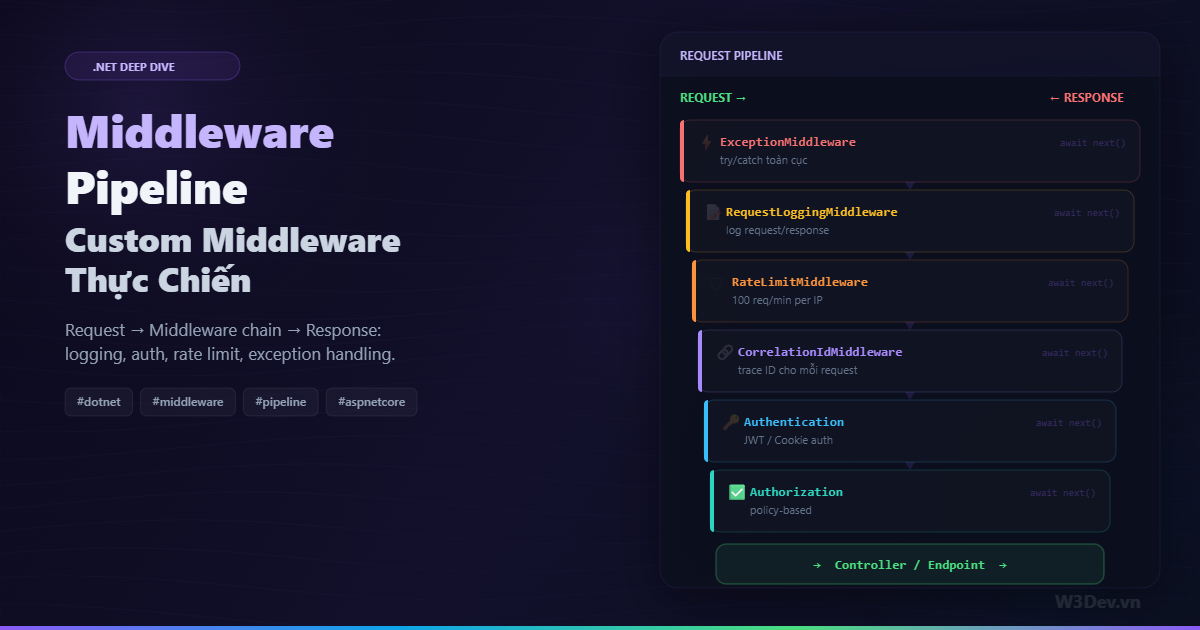
Trước khi viết custom middleware, cần hiểu rõ cơ chế. Middleware pipeline trong ASP.NET Core hoạt động theo mô hình Russian doll — mỗi middleware bọc lấy middleware tiếp theo:
Request vào
  → Middleware 1 (trước next)
    → Middleware 2 (trước next)
      → Middleware 3 (trước next)
        → Controller/Endpoint xử lý
      ← Middleware 3 (sau next)
    ← Middleware 2 (sau next)
  ← Middleware 1 (sau next)
Response ra
Mỗi middleware có quyền làm 3 việc: xử lý gì đó trước khi gọi next(), gọi next() để chuyển request đến middleware tiếp theo, và xử lý gì đó sau khi next() trả về (lúc này response đã được tạo).
Quan trọng: nếu middleware KHÔNG gọi next(), pipeline dừng tại đó — request không bao giờ đến controller. Đây là cách middleware authentication từ chối request chưa xác thực, hay rate limiter trả về 429.
// cấu trúc cơ bản nhất
public class MyMiddleware
{
    private readonly RequestDelegate _next;

    public MyMiddleware(RequestDelegate next)
    {
        _next = next;
    }

    public async Task InvokeAsync(HttpContext context)
    {
        // TRƯỚC: chạy trước khi request đi tiếp
        Console.WriteLine("Before next");

        await _next(context); // chuyển cho middleware tiếp theo

        // SAU: chạy sau khi response đã được tạo
        Console.WriteLine("After next");
    }
}
Thứ tự middleware CỰC KỲ quan trọng
Đây là lỗi phổ biến nhất. Thứ tự bạn gọi app.UseXxx() quyết định thứ tự middleware chạy. Đặt sai thì hệ thống hoạt động sai — và bug thường rất khó debug.
var app = builder.Build();

// ① Exception handler phải ở NGOÀI CÙNG
// để catch mọi exception từ tất cả middleware phía trong
app.UseExceptionHandler("/error");

// ② HTTPS redirect
app.UseHttpsRedirection();

// ③ Static files — trước routing để serve nhanh
app.UseStaticFiles();

// ④ Routing — xác định endpoint nào sẽ xử lý
app.UseRouting();

// ⑤ CORS — sau routing, trước auth
app.UseCors();

// ⑥ Authentication — xác thực user
app.UseAuthentication();

// ⑦ Authorization — kiểm tra quyền
app.UseAuthorization();

// ⑧ Custom middleware — sau auth để có user info
app.UseMiddleware<RequestLoggingMiddleware>();

app.MapControllers();
Một sai lầm mình từng mắc: đặt logging middleware TRƯỚC authentication, kết quả là log không có user info vì lúc đó chưa authenticate. Chuyện nhỏ nhưng mất nửa ngày mới nhận ra.
Middleware 1: Global Exception Handler
Đây là middleware mình khuyên bất kỳ project nào cũng nên có. Thay vì để exception bay ra ngoài và ASP.NET Core trả về HTML error page mặc định (hoặc tệ hơn, stack trace), bạn catch tất cả và trả về JSON chuẩn.
public class GlobalExceptionMiddleware
{
    private readonly RequestDelegate _next;
    private readonly ILogger<GlobalExceptionMiddleware> _logger;

    public GlobalExceptionMiddleware(
        RequestDelegate next,
        ILogger<GlobalExceptionMiddleware> logger)
    {
        _next = next;
        _logger = logger;
    }

    public async Task InvokeAsync(HttpContext context)
    {
        try
        {
            await _next(context);
        }
        catch (Exception ex)
        {
            await HandleExceptionAsync(context, ex);
        }
    }

    private async Task HandleExceptionAsync(HttpContext context, Exception ex)
    {
        var (statusCode, message) = ex switch
        {
            ArgumentException =>
                (StatusCodes.Status400BadRequest, ex.Message),

            UnauthorizedAccessException =>
                (StatusCodes.Status401Unauthorized, "Unauthorized"),

            KeyNotFoundException =>
                (StatusCodes.Status404NotFound, "Resource not found"),

            InvalidOperationException =>
                (StatusCodes.Status409Conflict, ex.Message),

            OperationCanceledException =>
                (StatusCodes.Status499ClientClosedRequest, "Request cancelled"),

            _ => (StatusCodes.Status500InternalServerError, "Internal server error")
        };

        // log khác nhau tùy severity
        if (statusCode >= 500)
        {
            _logger.LogError(ex, "Unhandled exception: {Message}", ex.Message);
        }
        else
        {
            _logger.LogWarning("Client error {StatusCode}: {Message}",
                statusCode, ex.Message);
        }

        // đảm bảo response chưa bắt đầu gửi
        if (!context.Response.HasStarted)
        {
            context.Response.StatusCode = statusCode;
            context.Response.ContentType = "application/json";

            var response = new
            {
                status = statusCode,
                message = message,
                traceId = context.TraceIdentifier,
                timestamp = DateTime.UtcNow
            };

            await context.Response.WriteAsJsonAsync(response);
        }
        else
        {
            // response đã bắt đầu gửi — không thể thay đổi status code
            _logger.LogWarning(
                "Response already started, cannot modify. TraceId: {TraceId}",
                context.TraceIdentifier);
        }
    }
}
Check context.Response.HasStarted là bắt buộc. Nếu middleware phía trong đã bắt đầu write response (ví dụ stream data), bạn không thể thay đổi status code hay header nữa — sẽ throw InvalidOperationException. Đây là nguồn gốc của lỗi "Headers are read-only, response has already started" mà nhiều người gặp.
Pattern matching ex switch giúp map exception type sang HTTP status code rõ ràng. Trong project thực tế, mình thường tạo thêm custom exception:
public class BusinessException : Exception
{
    public int StatusCode { get; }

    public BusinessException(string message, int statusCode = 400)
        : base(message)
    {
        StatusCode = statusCode;
    }
}

// trong switch expression, thêm:
// BusinessException bex => (bex.StatusCode, bex.Message),
Middleware 2: Request/Response Logging
Mọi API production đều cần log request và response. Vấn đề là body của request và response là stream — đọc xong thì mất, middleware phía sau không đọc được nữa. Phải buffer lại.
public class RequestLoggingMiddleware
{
    private readonly RequestDelegate _next;
    private readonly ILogger<RequestLoggingMiddleware> _logger;

    public RequestLoggingMiddleware(
        RequestDelegate next,
        ILogger<RequestLoggingMiddleware> logger)
    {
        _next = next;
        _logger = logger;
    }

    public async Task InvokeAsync(HttpContext context)
    {
        // đo thời gian
        var stopwatch = Stopwatch.StartNew();

        // log request
        var requestLog = await FormatRequest(context.Request);

        // thay response body bằng MemoryStream để capture
        var originalBody = context.Response.Body;
        using var responseBuffer = new MemoryStream();
        context.Response.Body = responseBuffer;

        try
        {
            await _next(context);
        }
        finally
        {
            stopwatch.Stop();

            // đọc response body
            responseBuffer.Seek(0, SeekOrigin.Begin);
            var responseBody = await new StreamReader(responseBuffer).ReadToEndAsync();

            // copy về stream gốc để client nhận được response
            responseBuffer.Seek(0, SeekOrigin.Begin);
            await responseBuffer.CopyToAsync(originalBody);
            context.Response.Body = originalBody;

            // log
            _logger.LogInformation(
                "HTTP {Method} {Path} → {StatusCode} in {Elapsed}ms | Request: {Request} | Response: {ResponseLength} bytes",
                context.Request.Method,
                context.Request.Path,
                context.Response.StatusCode,
                stopwatch.ElapsedMilliseconds,
                requestLog,
                responseBody.Length);
        }
    }

    private static async Task<string> FormatRequest(HttpRequest request)
    {
        // cho phép đọc body nhiều lần
        request.EnableBuffering();

        using var reader = new StreamReader(
            request.Body,
            leaveOpen: true);
        var body = await reader.ReadToEndAsync();

        // reset stream position cho middleware tiếp theo
        request.Body.Position = 0;

        // truncate body dài
        if (body.Length > 2000)
            body = body[..2000] + "...(truncated)";

        return $"Query={request.QueryString} Body={body}";
    }
}
Hai điểm cốt lõi ở đây:
request.EnableBuffering() — cho phép đọc request body nhiều lần. Mặc định request body là forward-only stream, đọc xong thì hết. Không có dòng này thì model binding ở controller sẽ nhận body rỗng.
Response body trick — thay context.Response.Body bằng MemoryStream, để middleware phía trong ghi response vào buffer thay vì gửi thẳng cho client. Sau khi đọc xong, copy buffer về stream gốc. Kỹ thuật này chuẩn nhưng tốn memory với response lớn — đừng dùng cho endpoint trả file.
Tối ưu: bỏ qua endpoint không cần log
public async Task InvokeAsync(HttpContext context)
{
    // skip health check, metrics endpoint
    if (context.Request.Path.StartsWithSegments("/health") ||
        context.Request.Path.StartsWithSegments("/metrics"))
    {
        await _next(context);
        return;
    }

    // skip file upload — body quá lớn
    if (context.Request.ContentLength > 1024 * 1024) // > 1MB
    {
        _logger.LogInformation(
            "HTTP {Method} {Path} — body too large to log ({Size} bytes)",
            context.Request.Method,
            context.Request.Path,
            context.Request.ContentLength);

        await _next(context);
        return;
    }

    // ... logging logic như trên
}
Middleware 3: Correlation ID
Khi hệ thống có nhiều service gọi nhau, bạn cần một ID duy nhất để trace request xuyên suốt chuỗi. Correlation ID middleware tạo hoặc forward ID này.
public class CorrelationIdMiddleware
{
    private const string HeaderName = "X-Correlation-Id";
    private readonly RequestDelegate _next;

    public CorrelationIdMiddleware(RequestDelegate next)
    {
        _next = next;
    }

    public async Task InvokeAsync(HttpContext context)
    {
        // nếu caller gửi correlation ID thì dùng, không thì tạo mới
        if (!context.Request.Headers.TryGetValue(HeaderName, out var correlationId)
            || string.IsNullOrWhiteSpace(correlationId))
        {
            correlationId = Guid.NewGuid().ToString("N"); // format ngắn, không dấu gạch
        }

        // lưu vào HttpContext để các service/controller truy cập
        context.Items["CorrelationId"] = correlationId.ToString();

        // thêm vào response header
        context.Response.OnStarting(() =>
        {
            context.Response.Headers.TryAdd(HeaderName, correlationId.ToString());
            return Task.CompletedTask;
        });

        // thêm vào log scope — mọi log trong request này tự động có CorrelationId
        using (_next.Target as IDisposable) { } // dummy
        using (context.RequestServices.GetRequiredService<ILogger<CorrelationIdMiddleware>>()
            .BeginScope(new Dictionary<string, object>
            {
                ["CorrelationId"] = correlationId.ToString()
            }))
        {
            await _next(context);
        }
    }
}
Phần BeginScope rất hay — nó inject CorrelationId vào mọi log message tự động. Nếu bạn dùng structured logging (Serilog, Seq), bạn có thể search tất cả log của một request chỉ bằng correlation ID.
Dùng trong controller:
[ApiController]
public class OrdersController : ControllerBase
{
    [HttpPost]
    public IActionResult Create(CreateOrderRequest request)
    {
        var correlationId = HttpContext.Items["CorrelationId"]?.ToString();

        // forward correlation ID khi gọi service khác
        _httpClient.DefaultRequestHeaders.Add("X-Correlation-Id", correlationId);

        // ...
    }
}
Middleware 4: Rate Limiting tùy chỉnh
Từ .NET 7 đã có built-in rate limiting, nhưng nếu bạn cần logic phức tạp hơn — rate limit per-tenant, whitelist IP, hay dynamic limit dựa trên subscription plan — thì custom middleware vẫn cần thiết.
public class TenantRateLimitMiddleware
{
    private readonly RequestDelegate _next;
    private readonly ILogger<TenantRateLimitMiddleware> _logger;

    // in-memory store — production nên dùng Redis
    private static readonly ConcurrentDictionary<string, TokenBucket> _buckets = new();

    public TenantRateLimitMiddleware(
        RequestDelegate next,
        ILogger<TenantRateLimitMiddleware> logger)
    {
        _next = next;
        _logger = logger;
    }

    public async Task InvokeAsync(HttpContext context)
    {
        // skip non-API routes
        if (!context.Request.Path.StartsWithSegments("/api"))
        {
            await _next(context);
            return;
        }

        var tenantId = ExtractTenantId(context);
        var limit = GetTenantLimit(tenantId);

        var bucket = _buckets.GetOrAdd(tenantId,
            _ => new TokenBucket(limit.MaxRequests, limit.WindowSeconds));

        if (!bucket.TryConsume())
        {
            _logger.LogWarning(
                "Rate limit exceeded for tenant {TenantId}. Limit: {Limit}/{Window}s",
                tenantId, limit.MaxRequests, limit.WindowSeconds);

            context.Response.StatusCode = StatusCodes.Status429TooManyRequests;
            context.Response.Headers.RetryAfter = bucket.RetryAfterSeconds.ToString();
            context.Response.ContentType = "application/json";

            await context.Response.WriteAsJsonAsync(new
            {
                status = 429,
                message = "Too many requests. Please try again later.",
                retryAfter = bucket.RetryAfterSeconds
            });
            return; // KHÔNG gọi next — pipeline dừng ở đây
        }

        // thêm rate limit headers
        context.Response.OnStarting(() =>
        {
            context.Response.Headers["X-RateLimit-Limit"] = limit.MaxRequests.ToString();
            context.Response.Headers["X-RateLimit-Remaining"] = bucket.Remaining.ToString();
            return Task.CompletedTask;
        });

        await _next(context);
    }

    private static string ExtractTenantId(HttpContext context)
    {
        // ưu tiên từ claim (sau auth middleware)
        var tenantClaim = context.User?.FindFirst("tenant_id")?.Value;
        if (!string.IsNullOrEmpty(tenantClaim)) return $"tenant:{tenantClaim}";

        // fallback: dùng IP
        return $"ip:{context.Connection.RemoteIpAddress}";
    }

    private static (int MaxRequests, int WindowSeconds) GetTenantLimit(string tenantId)
    {
        // production: đọc từ database hoặc config
        // ví dụ: free plan 60 req/min, pro plan 600 req/min
        return (100, 60);
    }
}

// token bucket implementation đơn giản
public class TokenBucket
{
    private readonly int _maxTokens;
    private readonly int _windowSeconds;
    private int _tokens;
    private DateTime _lastRefill;
    private readonly object _lock = new();

    public int Remaining => _tokens;
    public int RetryAfterSeconds =>
        Math.Max(1, _windowSeconds - (int)(DateTime.UtcNow - _lastRefill).TotalSeconds);

    public TokenBucket(int maxTokens, int windowSeconds)
    {
        _maxTokens = maxTokens;
        _windowSeconds = windowSeconds;
        _tokens = maxTokens;
        _lastRefill = DateTime.UtcNow;
    }

    public bool TryConsume()
    {
        lock (_lock)
        {
            Refill();
            if (_tokens <= 0) return false;
            _tokens--;
            return true;
        }
    }

    private void Refill()
    {
        var now = DateTime.UtcNow;
        if ((now - _lastRefill).TotalSeconds >= _windowSeconds)
        {
            _tokens = _maxTokens;
            _lastRefill = now;
        }
    }
}
Lưu ý middleware này KHÔNG gọi await _next(context) khi rate limit exceeded — response 429 trả về ngay, request không bao giờ đến controller. Tiết kiệm resource cho server.
Header Retry-After và X-RateLimit-Remaining rất quan trọng cho API consumers — client SDK có thể dựa vào đây để implement backoff tự động thay vì spam retry.
Middleware 5: Response Caching tùy chỉnh
Built-in response caching có nhiều hạn chế — không cache khi có Authorization header, không hỗ trợ invalidation linh hoạt. Middleware đơn giản dùng IMemoryCache:
public class ApiCacheMiddleware
{
    private readonly RequestDelegate _next;

    public ApiCacheMiddleware(RequestDelegate next)
    {
        _next = next;
    }

    public async Task InvokeAsync(HttpContext context, IMemoryCache cache)
    {
        // chỉ cache GET request
        if (context.Request.Method != HttpMethods.Get)
        {
            await _next(context);
            return;
        }

        // check endpoint có attribute [Cacheable] không
        var endpoint = context.GetEndpoint();
        var cacheAttr = endpoint?.Metadata.GetMetadata<CacheableAttribute>();
        if (cacheAttr == null)
        {
            await _next(context);
            return;
        }

        var cacheKey = $"api:{context.Request.Path}{context.Request.QueryString}";

        if (cache.TryGetValue(cacheKey, out CachedResponse? cached))
        {
            // cache hit — trả về ngay
            context.Response.StatusCode = cached!.StatusCode;
            context.Response.ContentType = cached.ContentType;
            context.Response.Headers["X-Cache"] = "HIT";
            await context.Response.Body.WriteAsync(cached.Body);
            return;
        }

        // cache miss — chạy pipeline bình thường
        var originalBody = context.Response.Body;
        using var buffer = new MemoryStream();
        context.Response.Body = buffer;

        await _next(context);

        // chỉ cache response thành công
        if (context.Response.StatusCode == 200)
        {
            buffer.Seek(0, SeekOrigin.Begin);
            var body = buffer.ToArray();

            cache.Set(cacheKey, new CachedResponse
            {
                StatusCode = context.Response.StatusCode,
                ContentType = context.Response.ContentType ?? "application/json",
                Body = body
            }, TimeSpan.FromSeconds(cacheAttr.DurationSeconds));
        }

        buffer.Seek(0, SeekOrigin.Begin);
        await buffer.CopyToAsync(originalBody);
        context.Response.Body = originalBody;
        context.Response.Headers["X-Cache"] = "MISS";
    }
}

// attribute đánh dấu endpoint cần cache
[AttributeUsage(AttributeTargets.Method)]
public class CacheableAttribute : Attribute
{
    public int DurationSeconds { get; }
    public CacheableAttribute(int durationSeconds = 60)
    {
        DurationSeconds = durationSeconds;
    }
}

public class CachedResponse
{
    public int StatusCode { get; set; }
    public string ContentType { get; set; } = "";
    public byte[] Body { get; set; } = Array.Empty<byte>();
}

// sử dụng
[HttpGet("products")]
[Cacheable(300)] // cache 5 phút
public async Task<IActionResult> GetProducts() { /* ... */ }
Header X-Cache: HIT/MISS giúp debug nhanh — mở DevTools, xem response header là biết có đang dùng cache hay không.
Đăng ký middleware
Extension method cho sạch:
public static class MiddlewareExtensions
{
    public static IApplicationBuilder UseGlobalExceptionHandler(
        this IApplicationBuilder app)
        => app.UseMiddleware<GlobalExceptionMiddleware>();

    public static IApplicationBuilder UseRequestLogging(
        this IApplicationBuilder app)
        => app.UseMiddleware<RequestLoggingMiddleware>();

    public static IApplicationBuilder UseCorrelationId(
        this IApplicationBuilder app)
        => app.UseMiddleware<CorrelationIdMiddleware>();

    public static IApplicationBuilder UseTenantRateLimit(
        this IApplicationBuilder app)
        => app.UseMiddleware<TenantRateLimitMiddleware>();

    public static IApplicationBuilder UseApiCache(
        this IApplicationBuilder app)
        => app.UseMiddleware<ApiCacheMiddleware>();
}
Đăng ký theo đúng thứ tự:
var app = builder.Build();

// ① exception handler — ngoài cùng, catch mọi thứ
app.UseGlobalExceptionHandler();

// ② correlation ID — tạo sớm để mọi log đều có
app.UseCorrelationId();

// ③ logging — sau correlation ID để log có trace ID
app.UseRequestLogging();

// ④ rate limit — trước auth để reject sớm, tiết kiệm resource
app.UseTenantRateLimit();

// ⑤ cache — trước auth cho public endpoint
app.UseApiCache();

// built-in middleware
app.UseAuthentication();
app.UseAuthorization();

app.MapControllers();
app.Run();
Những lỗi hay gặp
Inject scoped service vào middleware constructor. Middleware được đăng ký dưới dạng Singleton — tạo một lần, dùng cho mọi request. Nếu bạn inject DbContext (Scoped) vào constructor, nó sẽ bị captive dependency — giữ một instance duy nhất cho toàn bộ lifetime, leak connection, data cũ. Giải pháp: inject qua parameter của InvokeAsync:
// ❌ SAI — DbContext singleton suốt đời app
public class BadMiddleware
{
    private readonly AppDbContext _db;
    public BadMiddleware(RequestDelegate next, AppDbContext db)
    {
        _db = db; // captive dependency!
    }
}

// ✅ ĐÚNG — DbContext mới cho mỗi request
public class GoodMiddleware
{
    private readonly RequestDelegate _next;
    public GoodMiddleware(RequestDelegate next)
    {
        _next = next;
    }

    public async Task InvokeAsync(HttpContext context, AppDbContext db)
    {
        // db là scoped, tạo mới cho mỗi request
    }
}
Response body stream đã bị đọc. Nếu hai middleware cùng cố đọc response body bằng kỹ thuật buffer swap, middleware thứ hai sẽ đọc được buffer rỗng. Chỉ nên có MỘT middleware đọc response body.
Quên gọi next(). Nghe ngớ ngẩn nhưng xảy ra nhiều hơn bạn tưởng, đặc biệt khi có nhiều if/return sớm. Mỗi branch phải hoặc gọi next() hoặc tự trả response — không được return mà không làm gì.
Exception trong OnStarting callback. context.Response.OnStarting() chạy ngay trước khi response bắt đầu gửi. Nếu callback throw exception, nó sẽ rất khó debug vì stack trace không rõ ràng. Luôn wrap trong try-catch.
Testing middleware
Middleware nên được test độc lập, không cần spin up cả server:
[Fact]
public async Task ExceptionMiddleware_Returns500_OnUnhandledException()
{
    // arrange
    var middleware = new GlobalExceptionMiddleware(
        next: (ctx) => throw new InvalidOperationException("test error"),
        logger: NullLogger<GlobalExceptionMiddleware>.Instance);

    var context = new DefaultHttpContext();
    context.Response.Body = new MemoryStream();

    // act
    await middleware.InvokeAsync(context);

    // assert
    Assert.Equal(500, context.Response.StatusCode);

    context.Response.Body.Seek(0, SeekOrigin.Begin);
    var body = await new StreamReader(context.Response.Body).ReadToEndAsync();
    Assert.Contains("Internal server error", body);
}

[Fact]
public async Task RateLimitMiddleware_Returns429_WhenExceeded()
{
    var middleware = new TenantRateLimitMiddleware(
        next: (ctx) => Task.CompletedTask,
        logger: NullLogger<TenantRateLimitMiddleware>.Instance);

    // gửi 101 request liên tiếp
    for (var i = 0; i < 101; i++)
    {
        var ctx = new DefaultHttpContext();
        ctx.Request.Path = "/api/test";
        ctx.Response.Body = new MemoryStream();
        ctx.Connection.RemoteIpAddress = IPAddress.Parse("127.0.0.1");

        await middleware.InvokeAsync(ctx);

        if (i == 100)
        {
            Assert.Equal(429, ctx.Response.StatusCode);
        }
    }
}
DefaultHttpContext là bạn thân khi test middleware — nó fake toàn bộ HttpContext mà không cần web server.
Tổng kết
Middleware pipeline là một trong những thiết kế đẹp nhất của ASP.NET Core. Mỗi middleware làm đúng một việc, thứ tự rõ ràng, dễ thêm bớt mà không ảnh hưởng code khác. Khi bạn cần cross-cutting concern — logging, error handling, rate limiting, caching, tracing — middleware là nơi đặt nó, không phải controller hay service.
Năm middleware mình chia sẻ ở trên cover phần lớn nhu cầu thực tế: exception handler để không bao giờ trả stack trace cho client, request logging để biết chuyện gì đang xảy ra, correlation ID để trace qua microservices, rate limit để bảo vệ server, và response cache để giảm tải.
Copy, chỉnh sửa theo context project của bạn, rồi ship lên production. Đừng quên viết test cho từng middleware — chúng nằm trên critical path của mọi request, bug ở đây sẽ ảnh hưởng toàn bộ hệ thống.

Leave a comment
Your email address will not be published. Required fields are marked *